
😉 Well, let's compare the features of the two tools together so you can decide which one is best for you! ✅
Ready for Waalaxy vs Dripify? In the end, you'll forget Dripify and switch to Waalaxy. 🤫
Dripify Software - LinkedIn automation
🤖 Dripify.io is an American startup, founded in 2020. It's also a tool for automating prospecting, communication, and networking, primarily on LinkedIn.
💡 Dripify LinkedIn Software offers a full range of prospecting solutions on LinkedIn, accessible via different subscription plans. However, they’ve only recently started offering email features.
Dripify stood out for its specialized automation and personalization capabilities for LinkedIn prospecting campaigns. 🪄
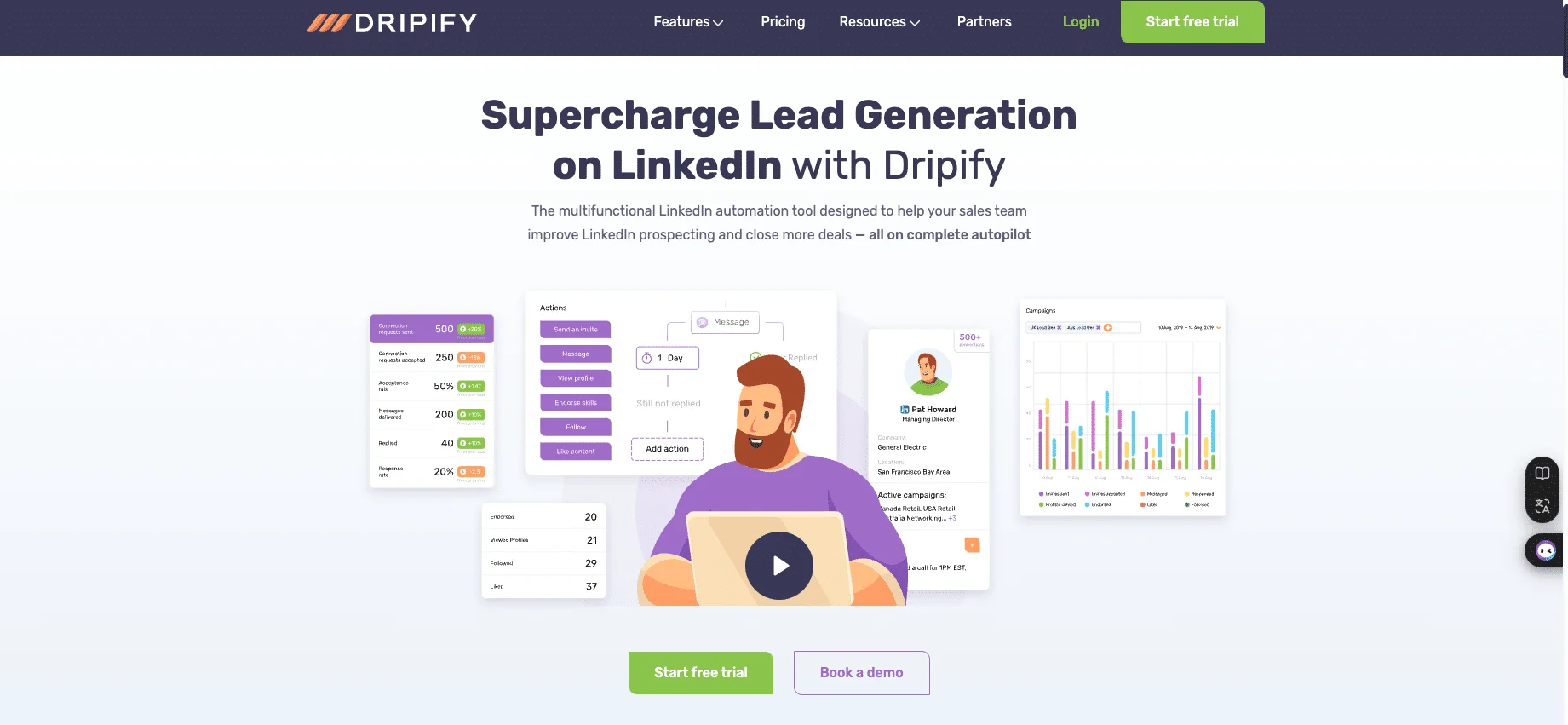
Here are the main features on offer:
🟠 Dashboard for tracking performance.
🟠 Dripify LinkedIn prospecting: send connection requests, like posts, personalized messages, automatic profile visits, skills approval, and more…
🟠 Integrations with third-party tools to help analyze results and send .
🟠 Creation of fully customized sequences to optimize every stage of prospecting and conversion on LinkedIn.
🟠 Profile optimization services.
🟠 Available in English only.
Dripify: Testimonials & User feedback
✅ What users like | ❌ What users criticize |
|---|---|
Easy to install and set up (though onboarding can take time for beginners) | Limited export options |
Active campaigns can be edited while running | Billing methods seen as unclear or not transparent 😱 |
Responsive and helpful customer support | Cannot unsubscribe from prospects who never accept your request |
Strong analytics and ready-to-use sequence templates | Team plan features considered too limited |
— | Lack of learning resources and guidance |
— | Features and vocabulary sometimes confusing for new users |
— | List customization remains very limited |
In short, Dripify.io isn't very accessible for beginners and is aimed at more advanced users already familiar with this type of tool.
But, from our point of view, it's unable to fully satisfy the ambitions of these profiles. 🤷🏻♀️
Waalaxy Tool - Best for LinkedIn Outreach
Waalaxy is a Google Chrome extension and SaaS platform, available by subscription and enabling the automation of prospecting campaigns through LinkedIn and Email, securely. 👽
It's the simplest, most intuitive and most effective digital solution on the market! 🚀
The solution has been designed for different types of customers: salespeople, marketers, agency founders, and recruiters. But unlike most tools on the market, it's accessible to beginners and more advanced users alike. 😇
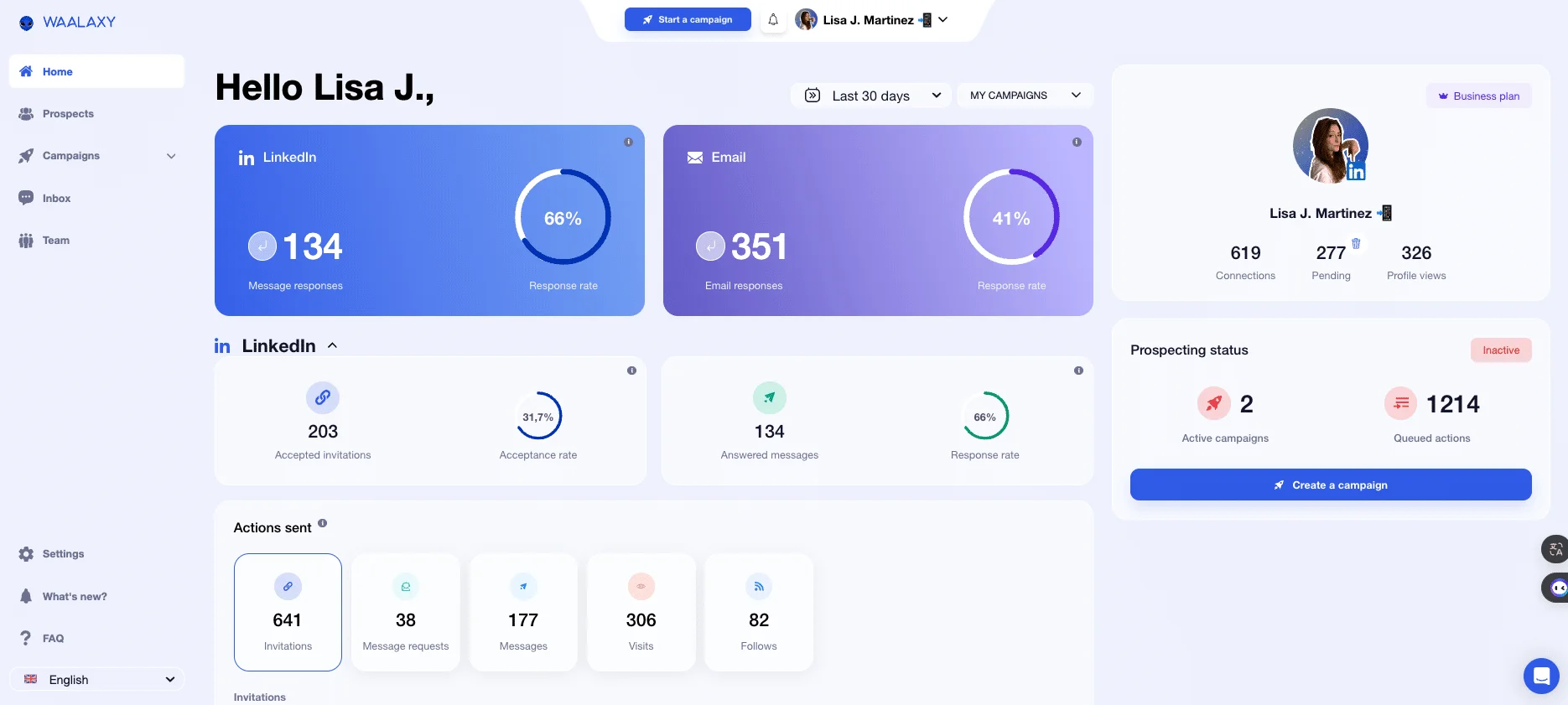
Here are the main features:
🟣 Launch LinkedIn campaigns (200 invitations/week, or 800 invitations/month).
🟣 Compatible with: HubSpot, Salesforce, NoCRM, Zoho, etc.
🟣 LinkedIn messaging for more efficient management of your conversations.
🟣 Retrieve business emails from leads with « Email Finder ».
🟣 Automated mass cold emailing.
🟣 AI-powered prospecting.
🟣 Automatically import prospects into lists.
🟣 Trigger auto-imports (for example, triggering an interaction as soon as someone sends you a connection request).
🟣 Available in 11 languages.
Waalaxy: Testimonials & User Feedback
✅ What users like | 🟠 What users suggest improving |
|---|---|
Very intuitive and easy-to-use platform (biggest strength mentioned) | Support for browsers other than Chrome |
Sequences and templates are well organized and directly accessible from the interface 💪🏼 | A mobile app to launch and monitor campaigns from anywhere 📲 |
Available in 11 languages, making it accessible worldwide 🌍 | More prospecting actions (e.g., likes, post sharing) 👍🏼 |
Helps optimize within LinkedIn’s weekly limits | — |
In short, Waalaxy has been designed to be accessible to beginners, but with its many features, it is well suited to profiles as well as more advanced strategies. 👨🏻💻
User reviews are excellent, and they consider it to be the best LinkedIn automation tool.
Want to try it out? Click here! 👇🏼
💥 Stay with us. Now let’s dive into the core comparison, Dripify VS Waalaxy.
Dripify vs Waalaxy: how much do they cost?
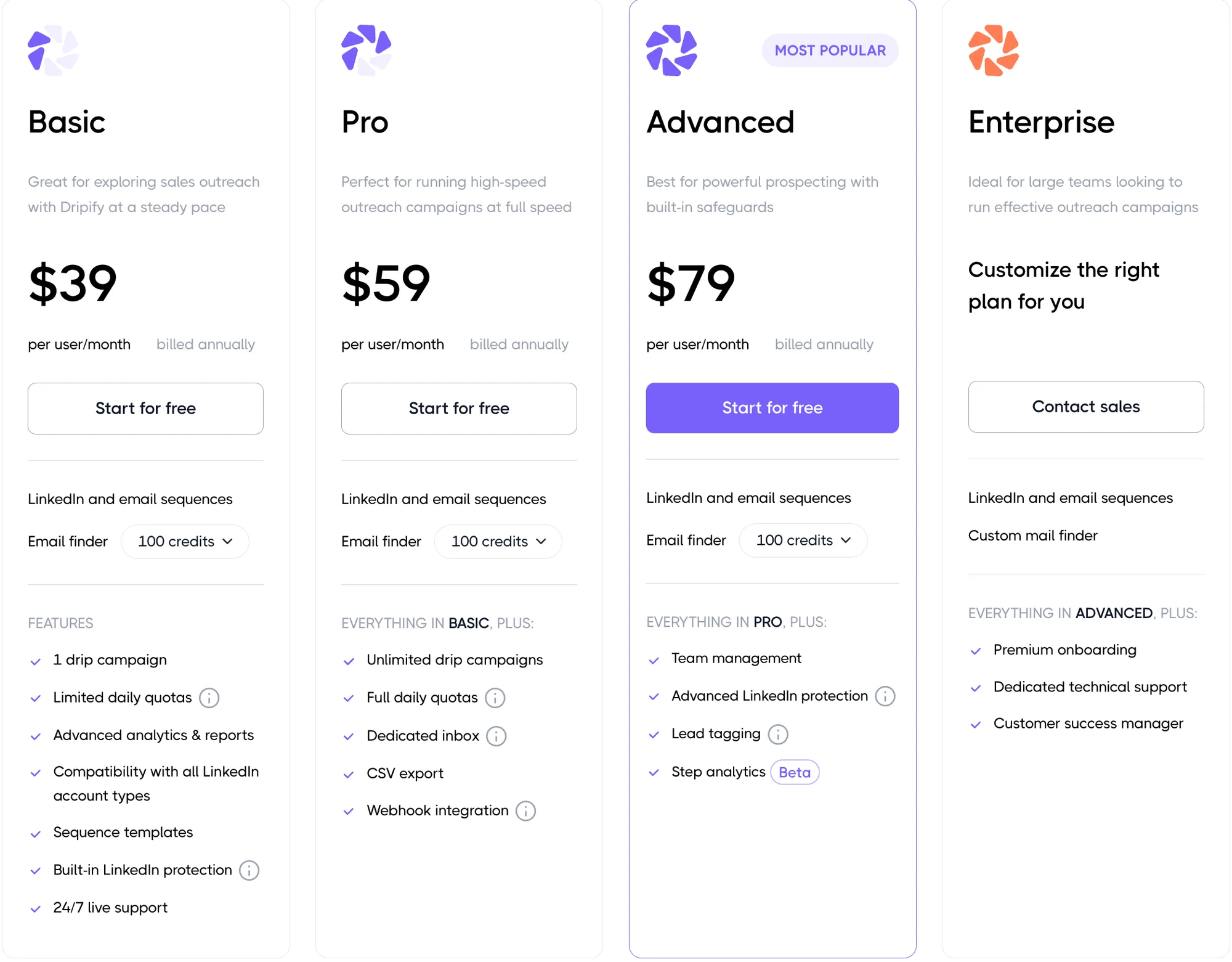
Dripify pricing
Waalaxy pricing
[waalaxy_price_table]
Dripify vs Waalaxy: Feature Comparison
Before choosing the tool that best suits your strategy or project, you need to discover the differences between the two interfaces so you can find the one you're most comfortable with! 🔍
Launch Automated Prospecting Campaigns - LinkedIn automation features
So that you can really compare Dripify VS Waalaxy, we're not just going to explain how it's done. We'll show you, too! 😉👇🏼
Waalaxy's Demo
🖱️ By clicking on “Create a campaign," you'll land on our intergalactic space! You'll find a sales dashboard that allows you to centralize, control, and choose where and how to direct your prospects!

When it's time to launch, you can choose between :
1️⃣ “Beginner”: ideal for beginners, these are simple sequences that are easy to use.
2️⃣ “LinkedIn”: more elaborate which, as the name suggests, which, as the name suggests, takes place only on LinkedIn.
3️⃣ “LinkedIn + Email”: multichannel with almost infinite possibilities.
You can also use inclusion and exclusion filters to help you find the right sequence even faster and/or suggest different models!
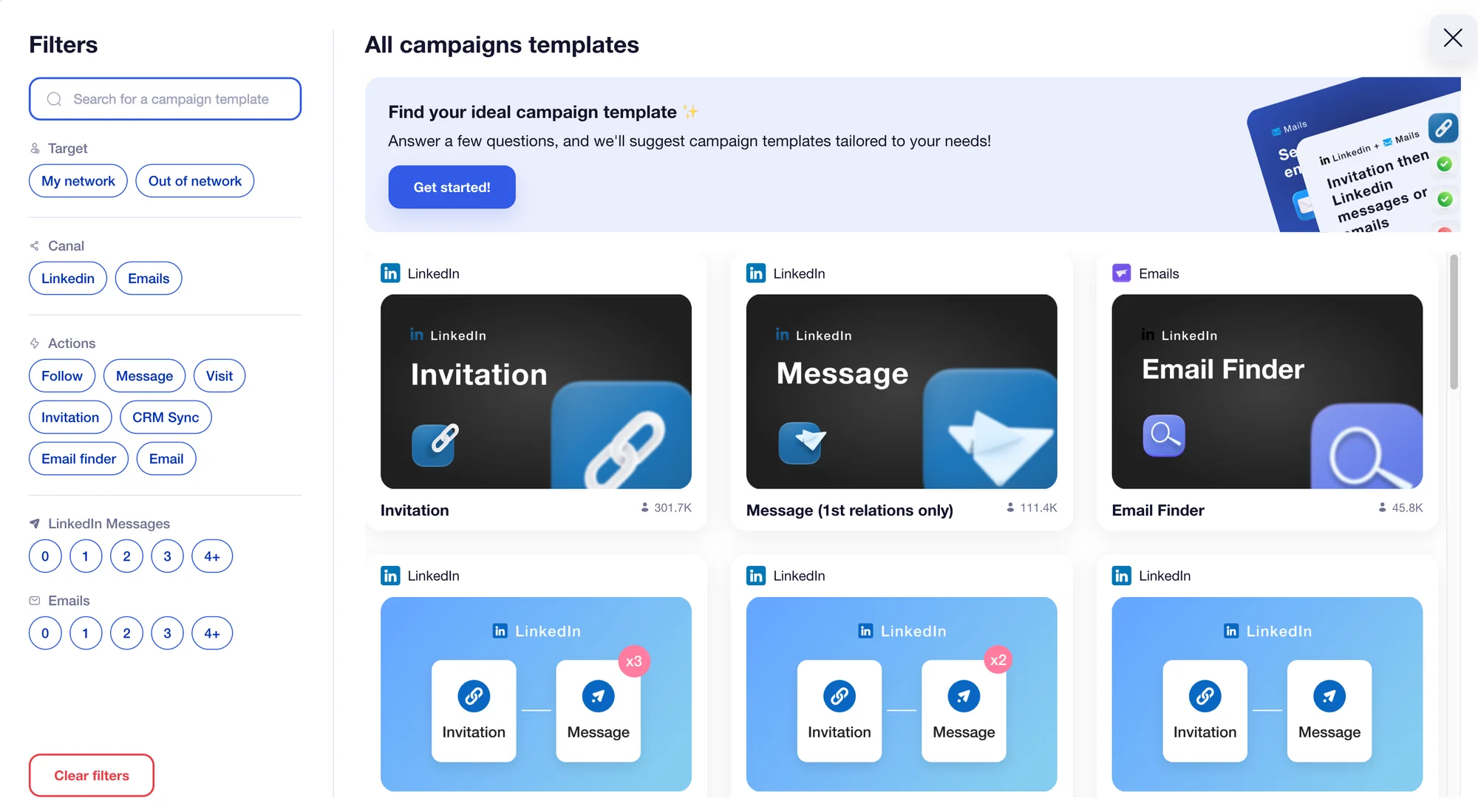
For our demonstration, the sequence “Invitation + 2 messages” will be used.
First of all, we advise you to (re)name it with the name of your projects, for example. It's just an option, but it's very useful for finding your way through the many campaigns!
Next, we'll suggest you choose between several methods for adding your leads. ⬇️

✅ When your leads have been successfully imported:
Firstly, if you wish, you'll be able to add a note to your invitations (knowing that not including one means a +10% chance of your invitation being accepted).
Next, you'll need to specify the delay time between the acceptance of the invitation before the next step is triggered. (from 0 to 28 days). 📆
So as not to make anyone jealous, we'll now move on to starting up a campaign on Dripify! 👀 After that, we'll continue with the configuration of the Waalaxy one, including message personalization.
Dripify's Demo
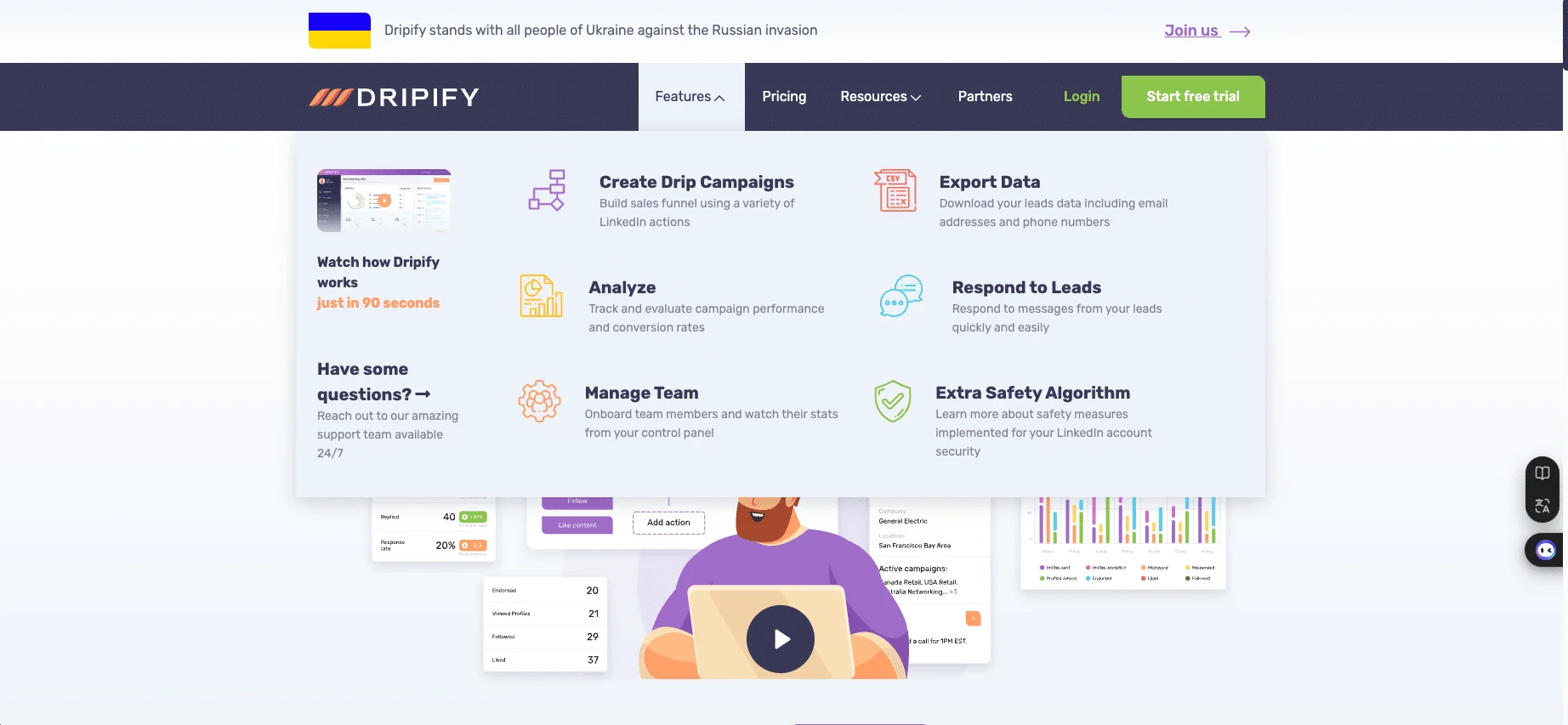
After the connection and onboarding stages (which are fairly lengthy), the tool offers a quick discovery of the application if required… 🔍
😮💨 Then you'll FINALLY be free to navigate the tool and launch your first campaign: click on "Campaigns" in the left-hand menu, then on "Add a campaign".👇🏼
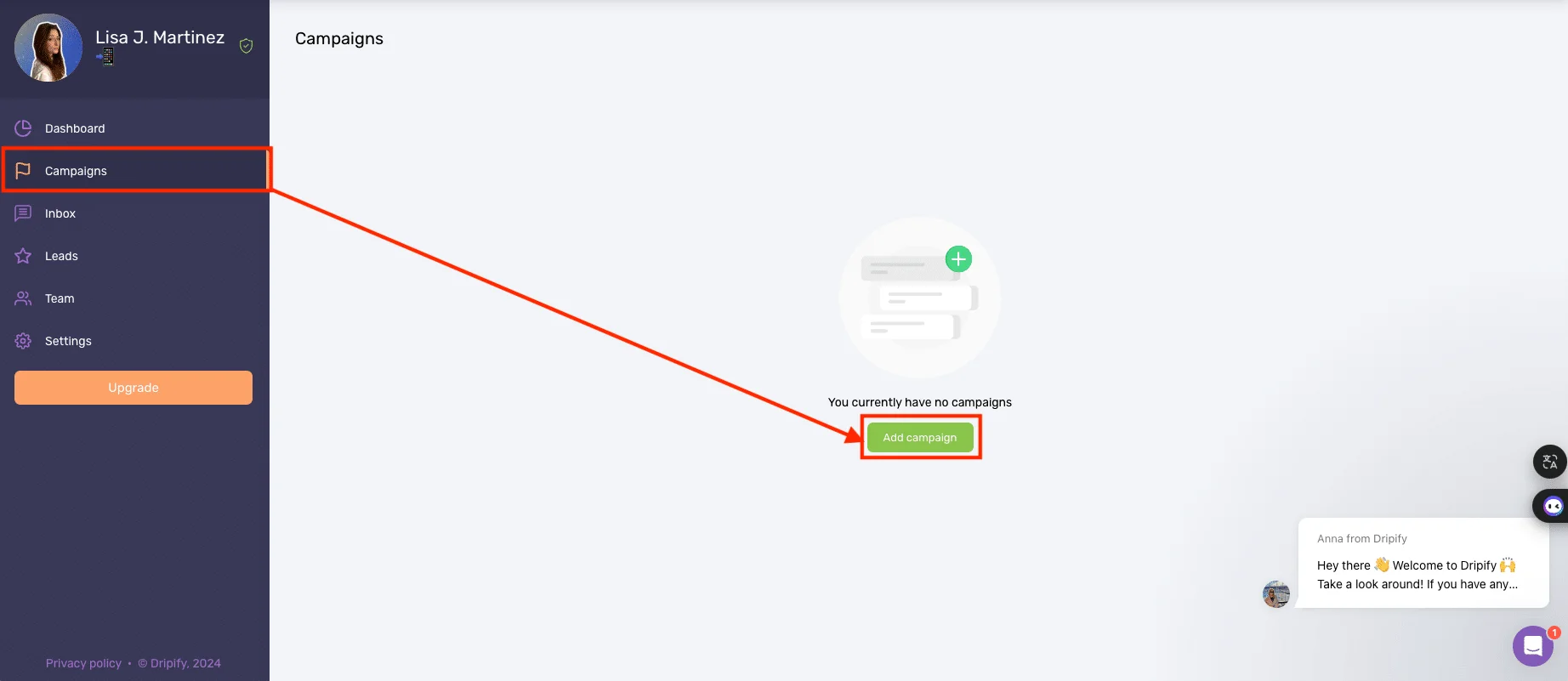
Then, in the next window, you can import your prospect list. For the example, we've chosen the "from a LinkedIn search" solution and imported "Head of Sales" profiles.
Then, when the selection is ready, copy and paste the URL of your LinkedIn search into the window dedicated to choosing the import.
Finally, there are still a few settings to be made (over and over again)… Before you can create your list! 🎉 Once your list has been imported, you'll need to select the type of campaign to launch:
Among the models proposed (very limited compared to Waalaxy, which offers hundreds): Lead Generation, Endorse Skills, or Profile Visits.
Or, if you know your way around, it's possible to build customized sequences.
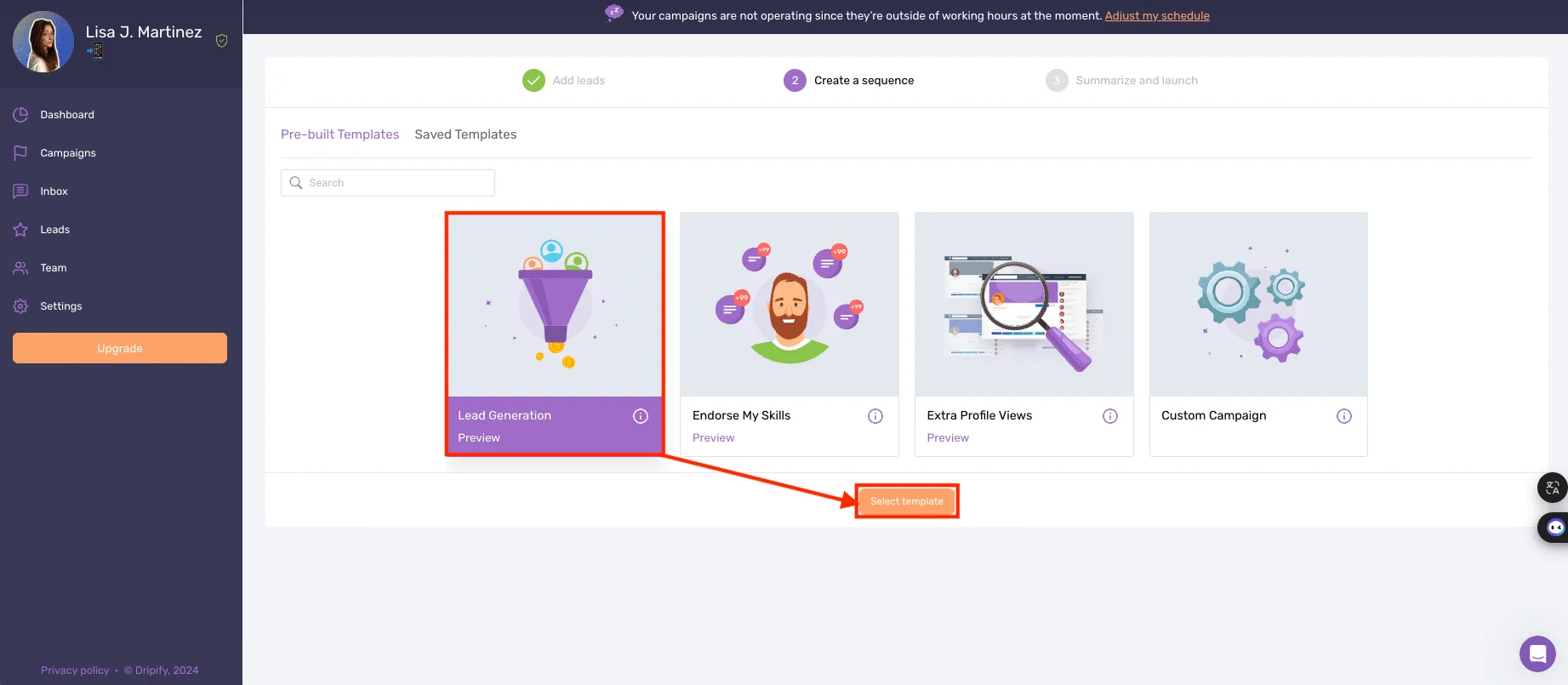
For this example, we'll use the "Lead generation" sequence.
Before continuing, here's a quick comparison chart of Dripify VS Waalaxy! campaign delivery. 👇🏼
Details | Waalaxy | Dripify |
|---|---|---|
Automated e-mailing | ✅ | ✅ |
Message personalization | ✅ | ✅ |
Multi-channel prospecting | ✅ | ✅ |
Integration with third-party tools | ✅ | ✅ |
Email templates library | In progress | ❌ |
Automated request tracking | ✅ | ✅ |
A/B tests | ✅ | ✅ |
Creating leads lists | ✅ | ✅ |
Import leads from LinkedIn via Chrome extension | ✅ | ❌ |
Sequence models based on use cases (sales, recruitment, etc.) | ✅ | ❌ |
Creating custom sequences | ❌ | ✅ |
Optimizing and Personalizing Messages
Promises made, promises kept! Now that you know how to launch your campaign, let's move on to message optimization. 👀
Waalaxy's tutorial
Let's pick up where we left off. Now we're going to show you how to write and personalize your own messages. ✍🏼
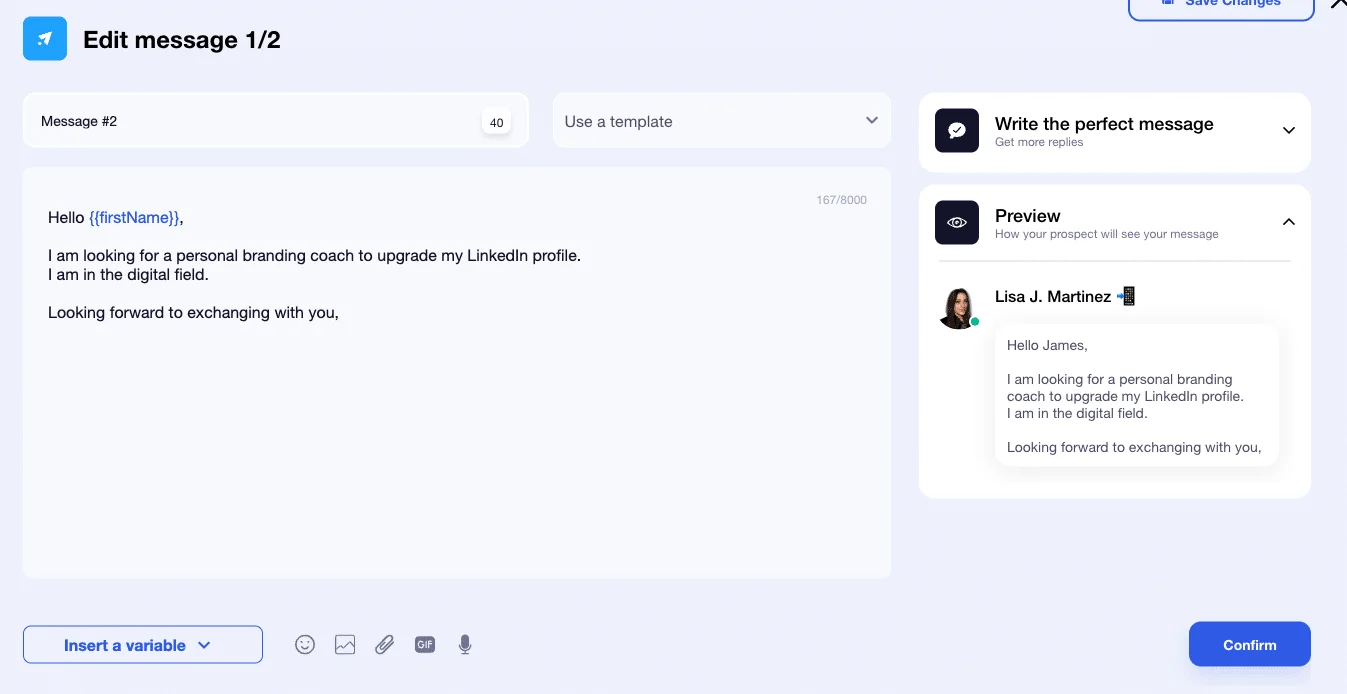
💡 It's nice to see that our message is the only thing present on this page, we're not disturbed by our own sequence.
To avoid repetition and typing errors, you'll be able to automatically add your own message template to those already offered on the space, and thus reuse it later. 👀
🛟 To help you with your project:
A checklist with advice on the elements to include and/or respect to write your message correctly.
Preview your text, and therefore the message to be sent, to check the rendering and correct operation of your variables.
Satisfied? That's great! You can validate to access the campaign summary. Now all you have to do is launch it. 🚀
Dripify's tutorial
Remember, we've just selected our "Lead Generation" sequence on Dripify.io, and it's displayed.
Before optimizing and customizing the chosen sequence, you can either use it as is or modify it.
In this case, we're going to use it as it is, and we're only going to look at the main actions: the invitation message and the personalization of interactions.
How to access the settings? Well, we've been looking for a long time (despite watching the Getting Started tutorial), and we found it completely by accident… 😅
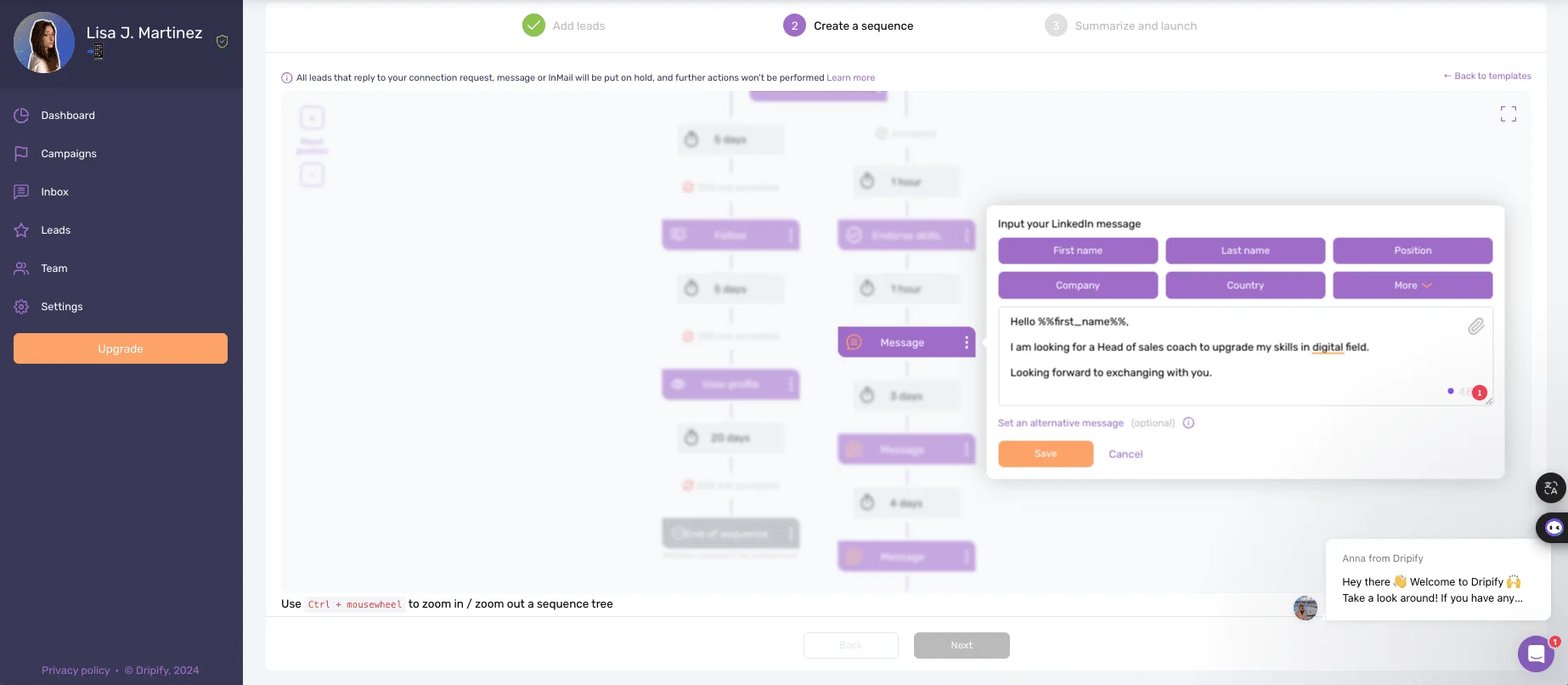
Once you've found the place to click to access optimization…you can write the content of the messages and include a multitude of variables.
❌ On the other hand, the tool informs us that they may not work due to missing information.
It is therefore proposed to record an "alternative" message, but this is not sufficient in our opinion. What's the point of proposing so many variables if some of them don't work? 🤔
In short, you'll need to do this for each interaction before setting the final sending details (campaign name, CRM tools, etc.).
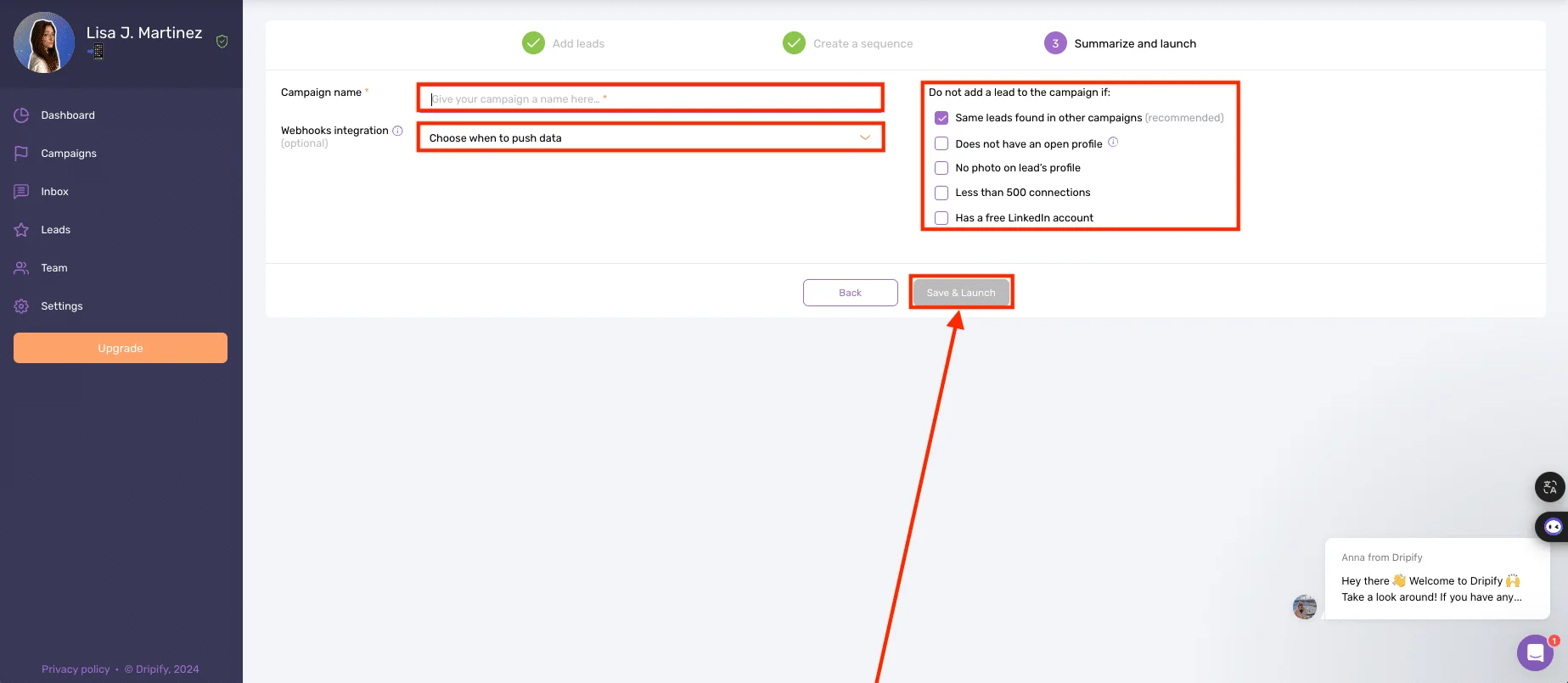
Once you've completed everything, you can finally launch your campaign (and not a moment too soon, it took us 15 minutes instead of just 5 with Waalaxy)! 😮💨
🎁 As a little gift, I'm summarizing the article for you in a visual, with all the details specific to Dripify VS Waalaxy messages.
Details | Waalaxy | Dripify |
|---|---|---|
Variables | ✅ | ✅ |
Images | ✅ | ✅ |
PJ | ✅ | ✅ |
GIF | ✅ | ❌ |
Voice notes | ✅ | ❌ |
Message templates | ✅ | ❌ |
Overview | ✅ | ❌ |
IA | ✅ | ❌ |
Response & Engagement Management
Once you've launched your campaign, it's essential to monitor its progress and analyze your results in relation to your planned . We'll show you how. 👇🏼
How does it work with Waalaxy?
🏠 From the home page, you'll find a super-precise and ultra-graphic dashboard displaying performance statistics to help you with your analysis.
📊 In the upper section, you will find separate statistics according to the channel used:
LinkedIn results such as number of active and pending LinkedIn connections, number of profile visits, reach of the last post…
Email results such as number of emails delivered and deliverability rate, number of emails sent & open rate, number of replies and response rates, and number of emails not delivered and bounce rate.
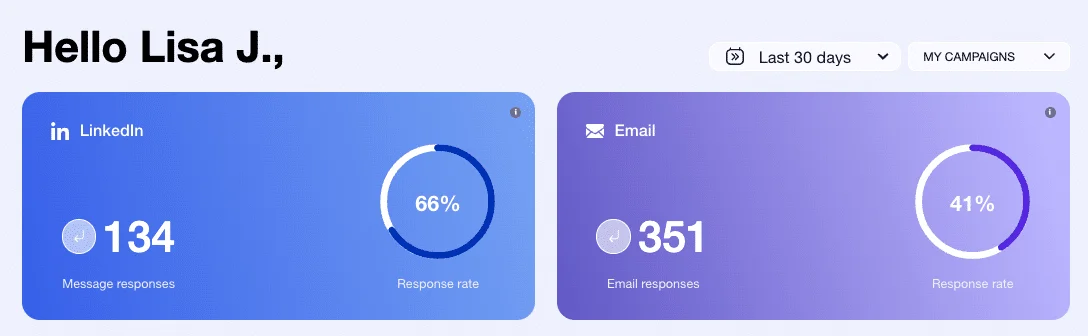
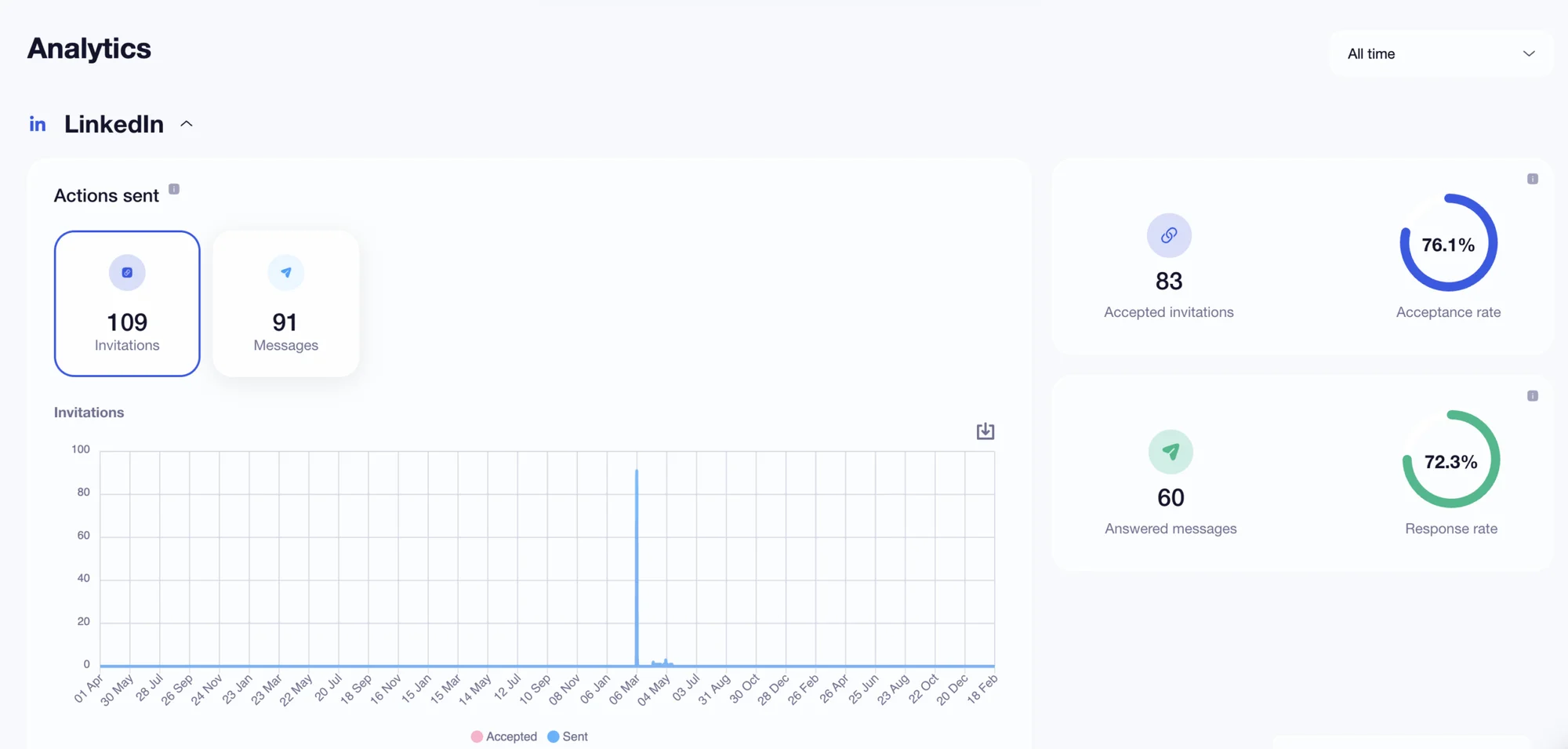
In the lower part of the table, you will find the LinkedIn-specific tracking indicators (different depending on the filters selected):
1️⃣ Leads: with the number of invitations accepted and the acceptance rate.
2️⃣ Statistics: with number and response rate to messages.
3️⃣ A last one with details of actions sent in the form of graphs (data downloadable via CSV file).
💡 Finally, the dashboard offers different views:
Details by campaign and time period in the “statistics” section to segment your results' visualization.
Activity of the week by actions with the possibility to use filters to obtain precision in the comparison of the data.
Global with the results of all those launched (by channel).
However, it does not display data and statistics for just one of them.
This is the “Staff” section, which offers a global view with several performance indicators and information, and will certainly be of interest to statistics buffs: ⬇️
Prospect details by level.
The name of each lead with their characteristics:
Stage.
Status.
Prospect list.
Import type.
Tag, which allows you to associate one or more groups per contact, to easily classify and identify your leads.
Filters for all the features mentioned above.
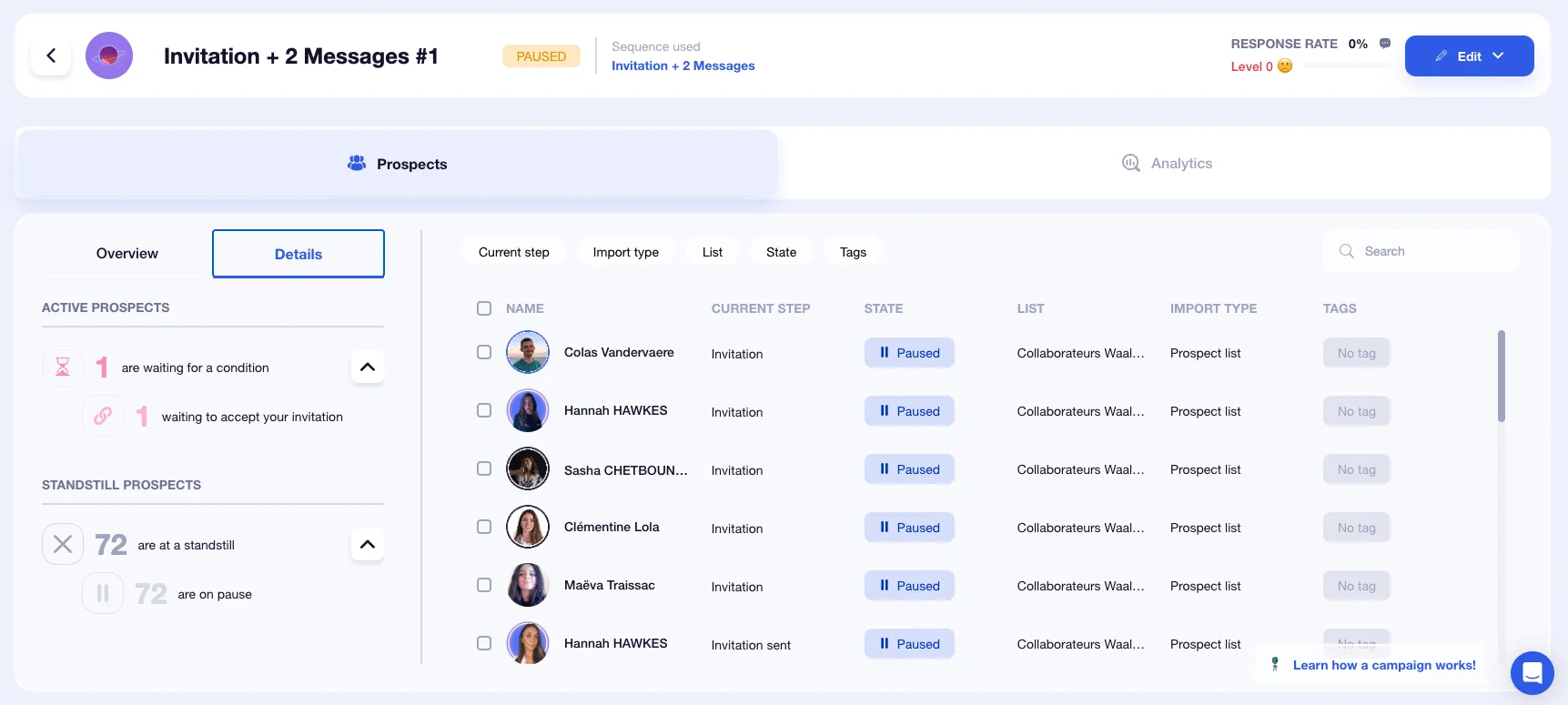
The real differentiator of the solution is its ease of use: everything is done to make the tool accessible to everyone, not just experts in statistics and prospecting! 😇
That's it, results analysis no longer holds any secrets for you! Now you have all the keys 🔑 to successfully exploit the results of your campaigns!
How does it work with Dripify?
🟠 We're back on Dripify.io! 📊
Click on the "Dashboard" tab from the menu to access the statistics and performance of your campaigns.
On this tab, you'll find very few statistics:
An overview of activity and recent campaigns.
A graph showing non-detailed campaign results.
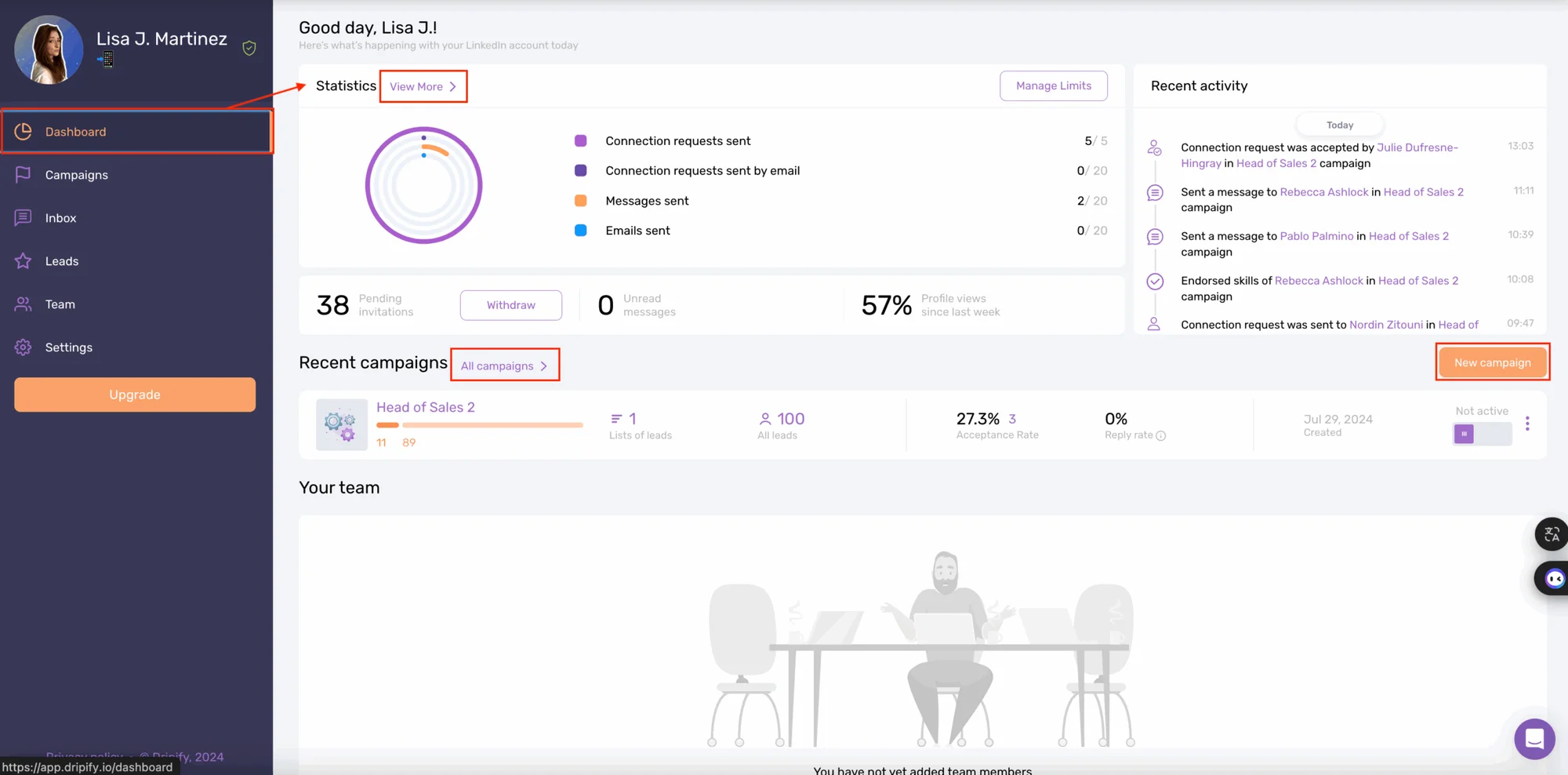
And, that's all. 😳
🤔 We'd like to point out that:
No distinction is made between the different types of results or campaigns (LinkedIn/Email), everything is mixed together, and the view is too broad for the time being.
The Your Team tab takes up a lot of space, even though it's not necessarily useful to all users, and the space could be exploited to fill in more data.
To access more details, click on "View more", you'll be able to filter and/or export your results, but you won't be able to customize your dashboard. 😖
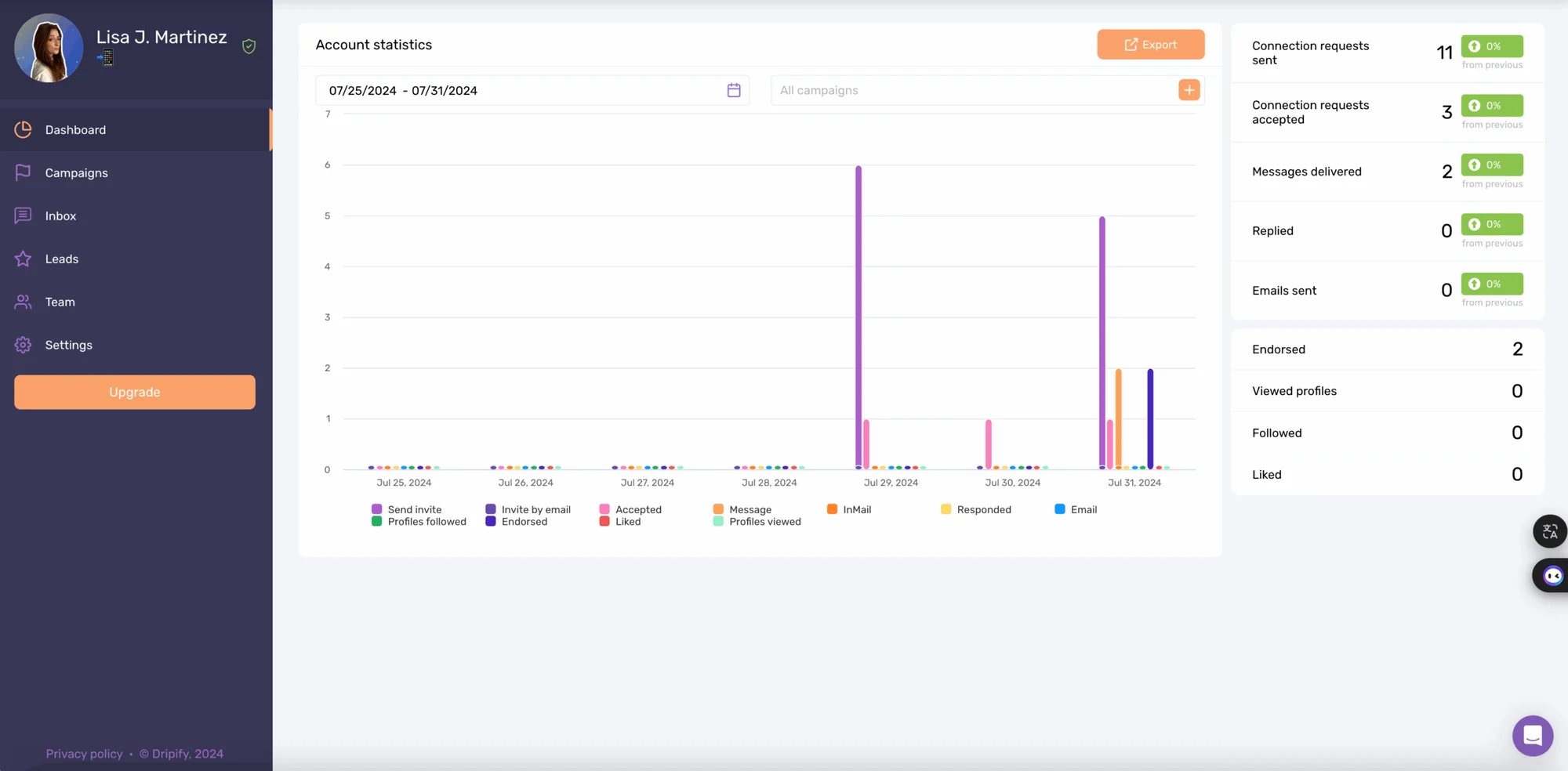
Unfortunately, the analysis and statistical calculation capabilities stop there…. 😢 That's why the tool allows integration with more advanced analytics tools.
We'll look at this in the next section! Before that, here's another little comparison chart specific to Waalaxy VS Dripify tracking and statistical analysis. 👇🏼
Details | Waalaxy | Dripify |
|---|---|---|
Home page statistics | ✅ | ✅ |
Home page filters | ✅ | ✅ |
Performance Indicators (KPIs) | ✅ | ✅ |
Separate statistics for LinkedIn outreach and e-mail outreach | ✅ | ❌ |
Suitable for beginners | ✅ | ❌ |
Integration & Compatibility With Other Tools
🔗 The integration and compatibility of the chosen digital solution with third-party tools is essential. This allows you to take advantage of the full functionality of at least two tools combined!
Now let's see how it works in practice. 👀
Waalaxy's Demo
This step is often dreaded by users of most prospecting automation tools on the market. But not with Waalaxy! 🤩
First of all, the interface can be linked to a number of CRMs, including. ⬇️
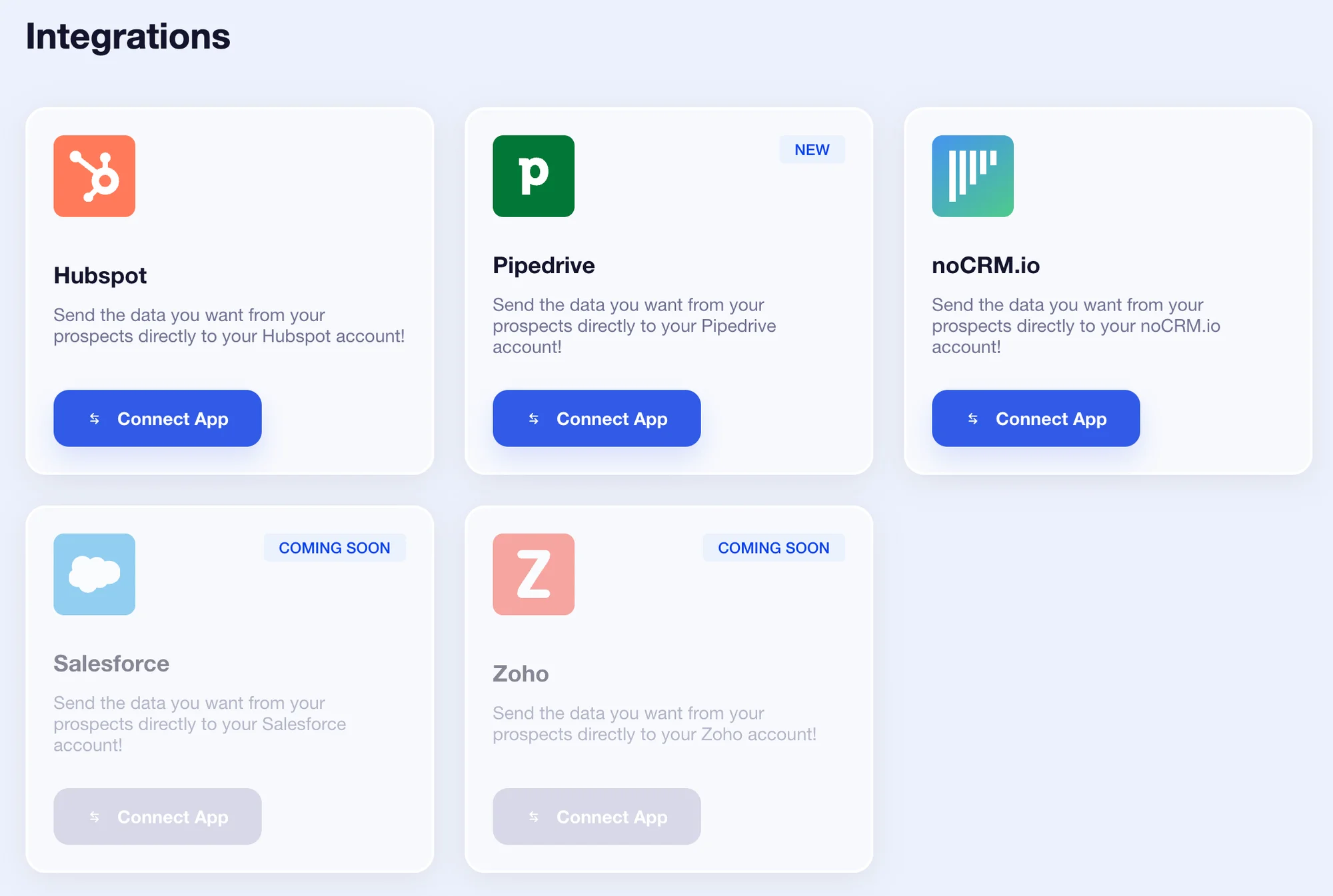
But you can also integrate other tools to take your prospecting to the next level! 👇🏼
Sendinblue.
Axonaut.
Sellsy.
Airtable.
Google Sheets.
🍒 AND icing on the cake, you'll discover that synchronization is simple to understand and use!
Dripify's Demo
⚙️ As we have already seen, the integration of third-party tools can only be done from the "Campaigns" tab and at the last stage of the campaign launch.
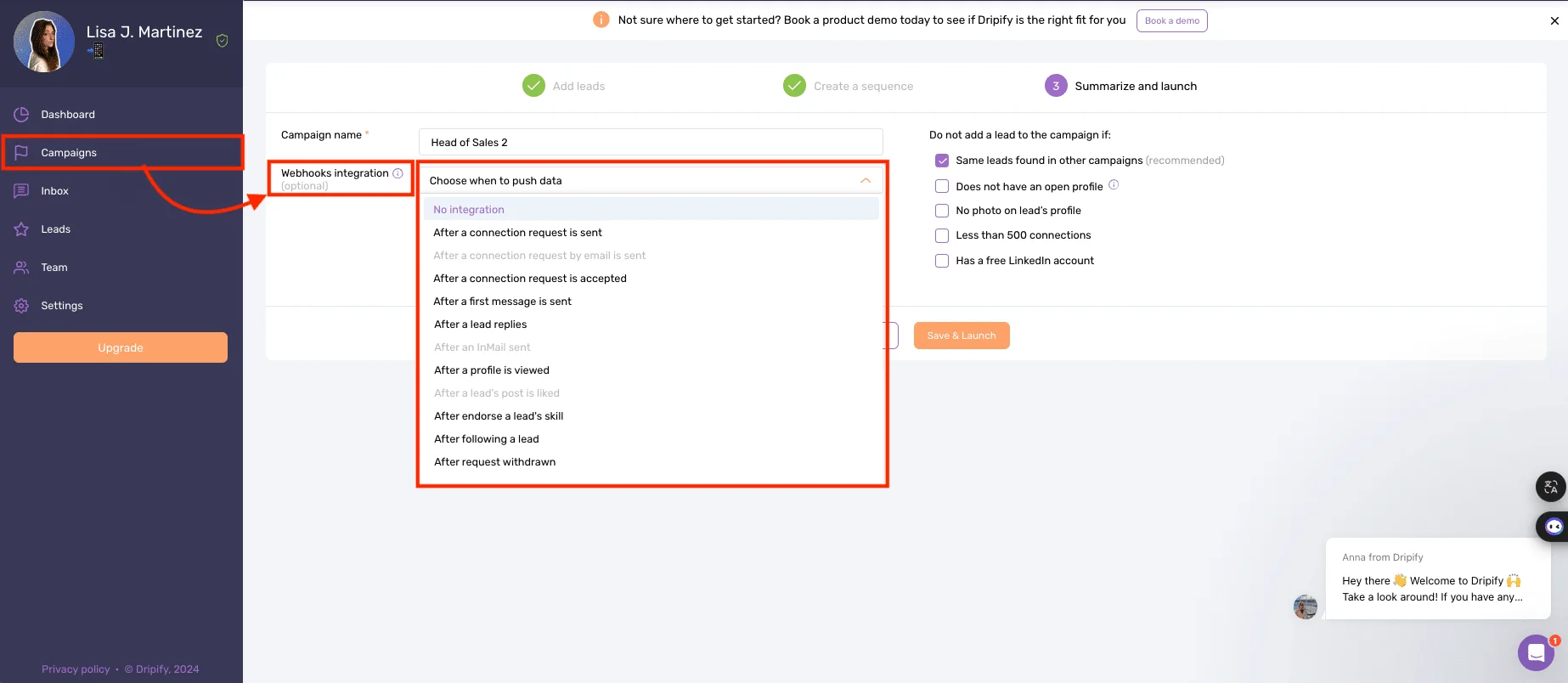
You can choose in which case(s) your results will be transmitted to the tool you have chosen to integrate… 🥁
❌ On the other hand, there's a slight problem with how this works:
We don't know which third-party tools can be integrated into Dripify, we have no list or icon or call to action that tells us.
Impossible to integrate a tool by default to all actions and campaigns launched on the tool.
The same parameters must therefore be applied manually to each campaign to be able to compare and adjust as needed. 😱
It's hard for a beginner to know how to select the right synchronization conditions (of which there are many).
Even for an experienced user, at the slightest error, results and performance reports could be wrong or meaningless.
Finally, data will be difficult to retrieve, given the level of precision of the dashboard. 🙄
Users Interface Accessibility
⏳ It's time to talk about accessibility, design, and ease of use of the interface. This is what will make you definitely adopt a tool (or not)!
Waalaxy's Tutorial
At first glance, the interface stands out as sexy! ✨ At once intuitive, ergonomic, uncluttered, coherent, and harmonious... Navigation is almost mindless because it's simple know what you want to achieve and how to get there.
And we love the fact that scenario management is very visual 🫶🏼, which reduces the number of manipulations and saves an incredible amount of time.
Finally, once you've taken a look at the entire interface, it's pretty obvious that Waalaxy has focused on visual consistency and ease of use!
For example, in your prospect lists, we can see that there is a color scheme for status and action icons:
🩶 Gray: not connected.
🧡 Orange: waiting.
💙 Blue: connected.
💡 To guide you, a description of each icon appears when you hover your mouse over it.
🔎 Waalaxy offers an Email Finder, which works by credit. 🪙 No need to dig around to find details of your available or remaining credits, the information can be accessed directly by clicking on our name.
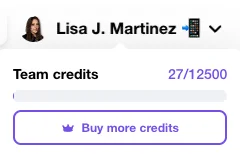
We keep saying it, but the big plus of this solution is simplicity! Because creating and analyzing a campaign quickly doesn't have to require a bachelor's degree. 😅
🌈 Always in a colorful and friendly atmosphere, you can see your response rate with a level scale (going from 0 to 3) whose details appear by hovering the mouse over it.
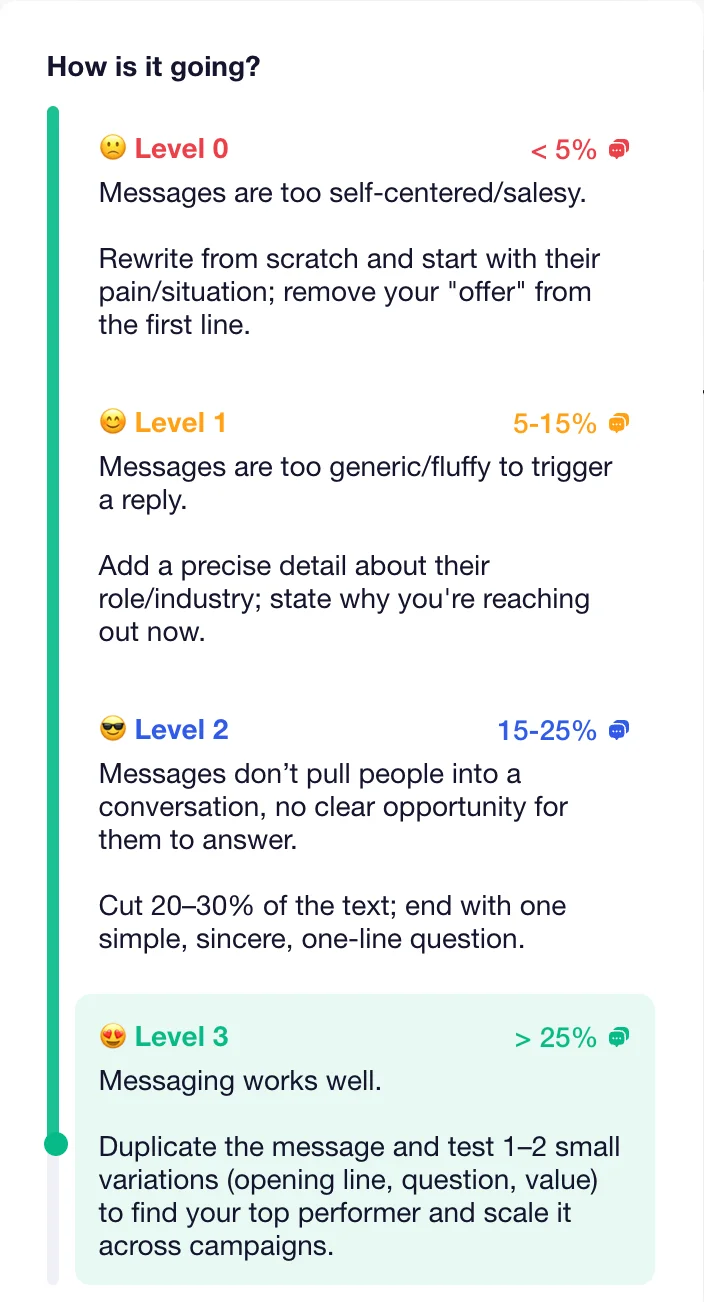
Let's face it, it's pretty magical to feel guided and supported from start to finish, isn't it? 😇
Dripify's Tutorial
The interface is very classic… but the brand identity remains consistent (purple, orange, dark blue) between the different pages. 👀
The whole thing is unfortunately a bit boring, as there's little work around the design (weak ergonomics, positioning of elements, accessibility…). 👀
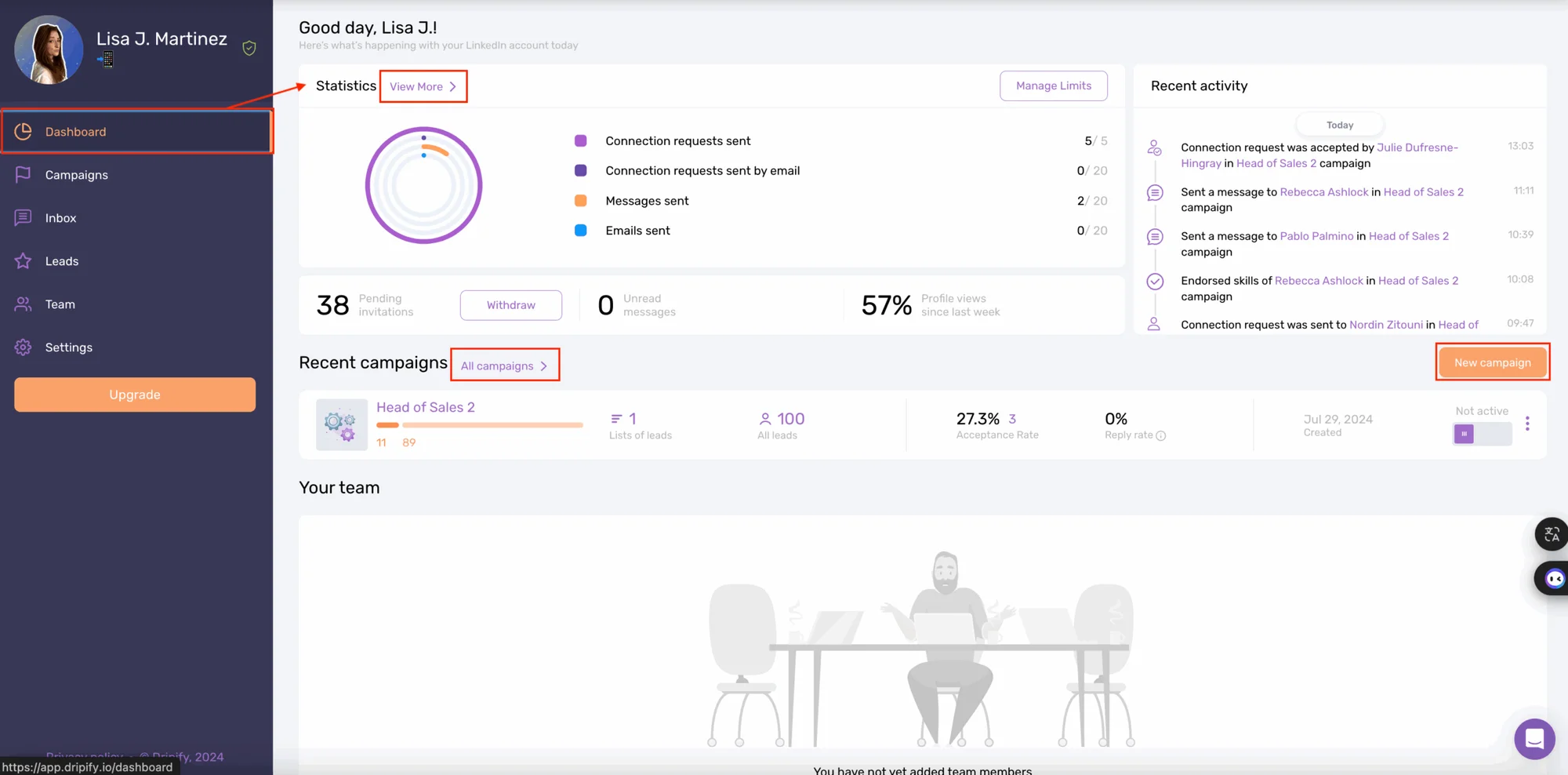
Overall, we spend time looking for elements and take little pleasure in using and navigating the tool. 🧐
😠 Some little details that bugged us a bit:
There are a lot of steps to achieve, whether it's onboarding the tool or launching campaigns.
The whole thing is a bit static: for example, there aren't many animations on the site, and launching and progress aren't very visual.
The resources are not present on the software and can only be accessed via the website menu.
We don't know how long the free trial period will last, so you'll have to sign up first.
The tool is available in English only.
Last but not least, Dripify.io offers (since very recently) email credits and email sending, which was previously only possible with a third-party tool.
⚠️ However, please note that prospect responses will not be visible in the back office. So you'll need to configure your inbox to respond separately from the automation software.
🏁 That's it for this user interface section, so here's our comparison and summary table reappearing ⬇️ :
Details | Waalaxy | Dripify |
|---|---|---|
Available in French | ✅ | ❌ |
Design & Structure | ✅ | ✅ |
Consistent graphic charter | ✅ | ✅ |
Campaign accessible from the home page | ✅ | ✅ |
Smart menu | ✅ | ❌ |
Ease of use | ✅ | ❌ |
Animations | ✅ | ❌ |
User Support & Resources
To have everything you need at your fingertips so you can use the tool on your own, without having to go through customer support. This is the dream of any user who wants to launch a project. 💭
We're going to analyze the quality of the support offered to help them realize this dream. ✨
Waalaxy Resources
Chat support is highly responsive and open Monday to Friday from 8.30am to 6pm. 📆 If you need to, you can suggest your own interface improvements. 💡
🚨 Don't call support just yet. First, try looking at the problems other users have had and for which a clear and precise answer is provided (with videos).
📚 Finally, don't hesitate to consult the hundreds of articles available on the blog and Help Center to help to guide you in your use of the tool!
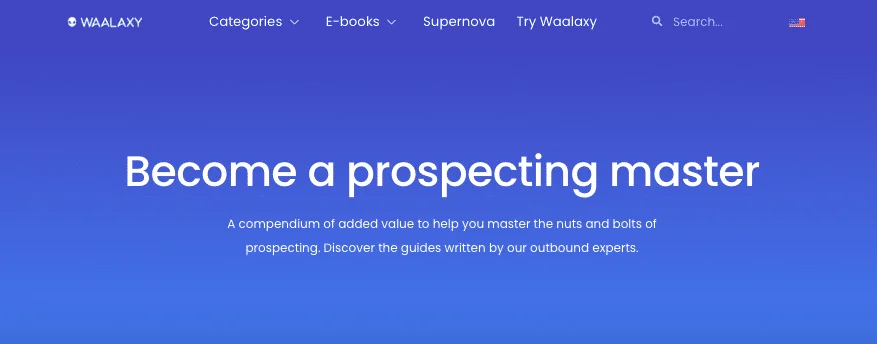
It's not over yet! 🤩 If, with all that, you still can't find what you're looking for, you're invited to join a public Facebook group (+3900 members). It aims to exchange best practices, the latest techniques, a wide variety of specialized tools, etc.
And if, really, you want to go further and read even more content, you have:
📖 A daily newsletter.
🎬 A YouTube channel.
👀 A blog with hundreds of articles (LinkedIn, marketing, prospecting, emailing, social networks, automation, recruitment...).
🎥 Webinars.
📘 An e-book on successful prospecting.
You can also participate in the evolution of the interface's functionalities and follow it in real time with the public roadmap! 🤩
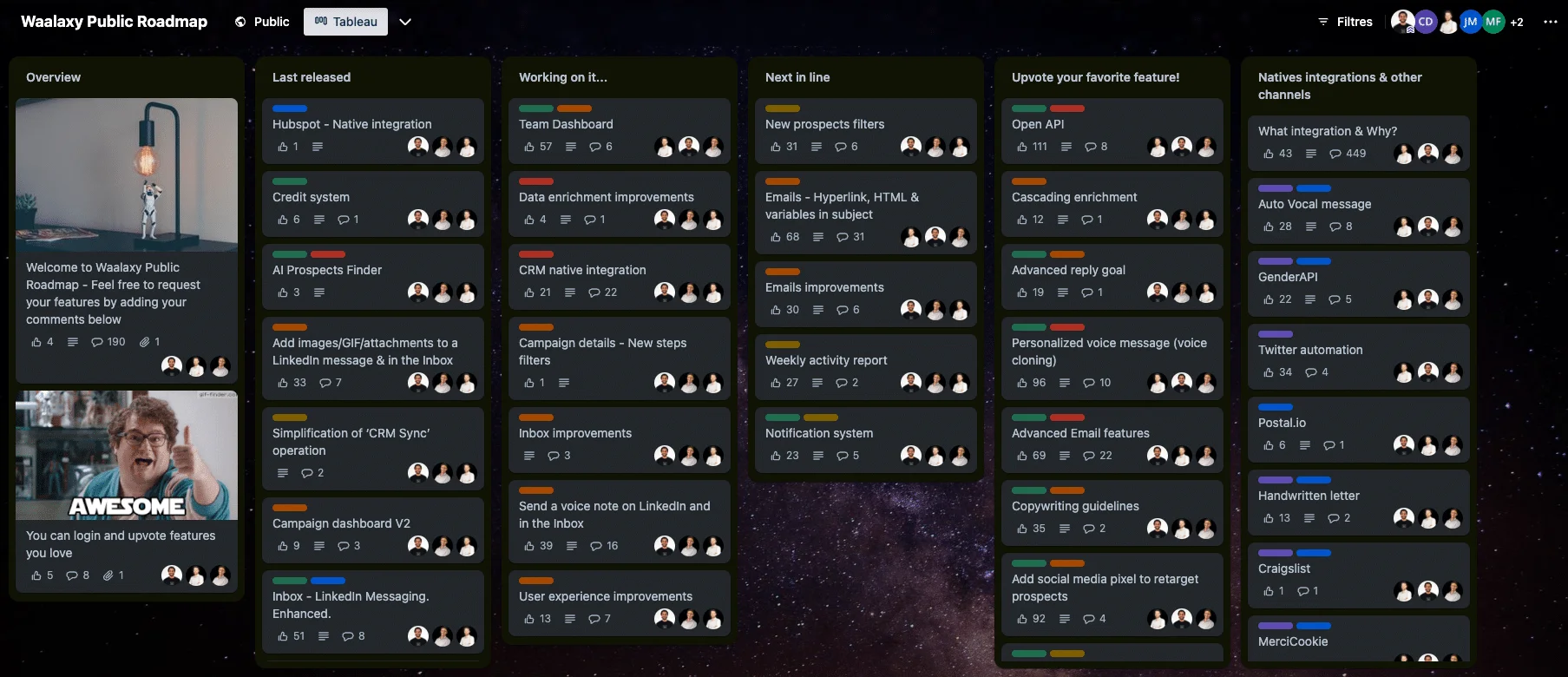
What's a roadmap? Quite simply, it's a product master plan that's accessible to everyone! It provides a vision of the product's evolution:
🟣 Latest releases.
🟣 Those under development.
🟣 The chance to vote for your favorite.
Dripify Resources
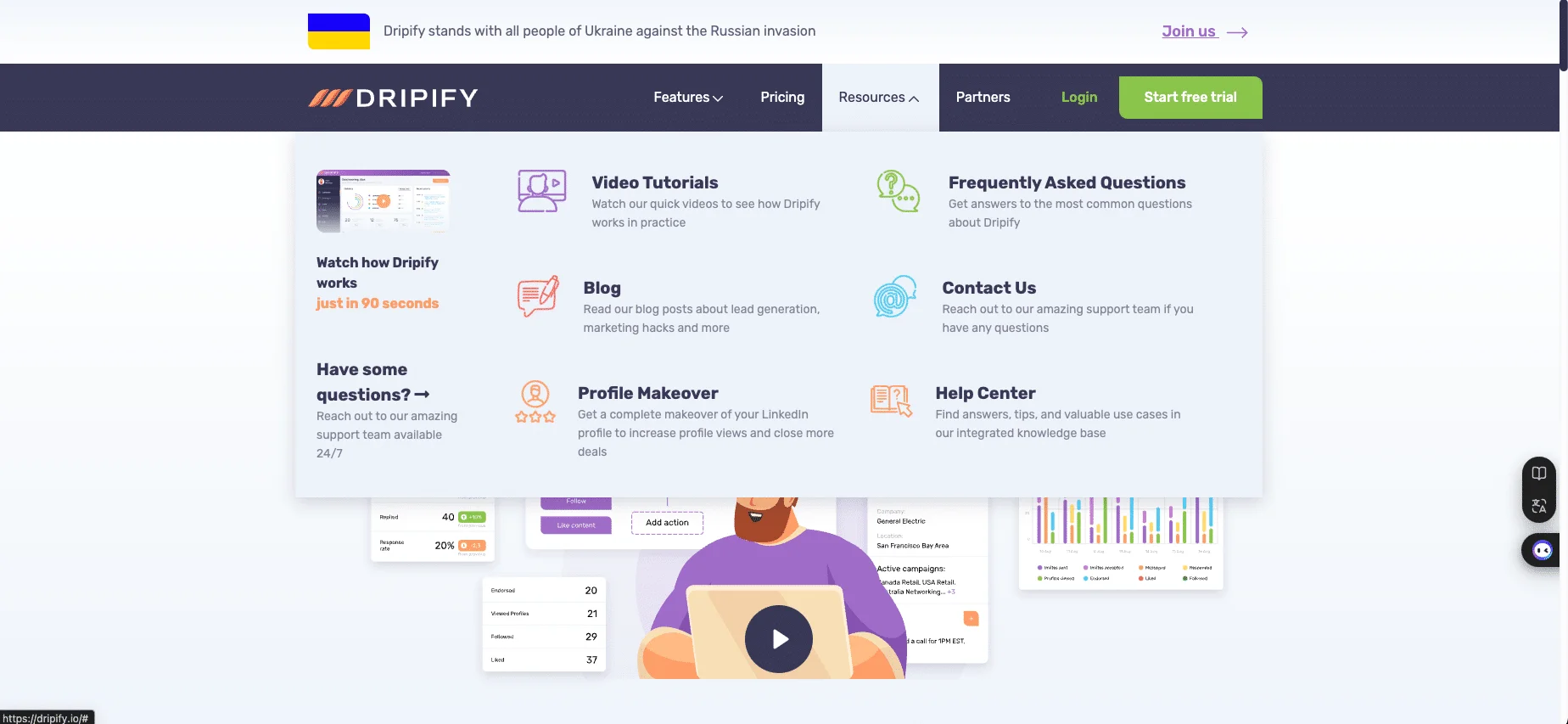
Here, a number of resources are made available but are not given much prominence (not available on the interface, only on the website):
🟠 Blog, with rather limited articles (according to customer reviews) on using the platform and tips for prospecting.
🟠 FAQ, with a few questions asked, but not many.
🟠 Tutorial videos, rather conventional and not very humanized, with mostly "screen capture videos."
🟠 Help Center with articles on specific use cases.
🟠 Customer support, available 24/7 and reachable only by e-mail or form (no chatbot).
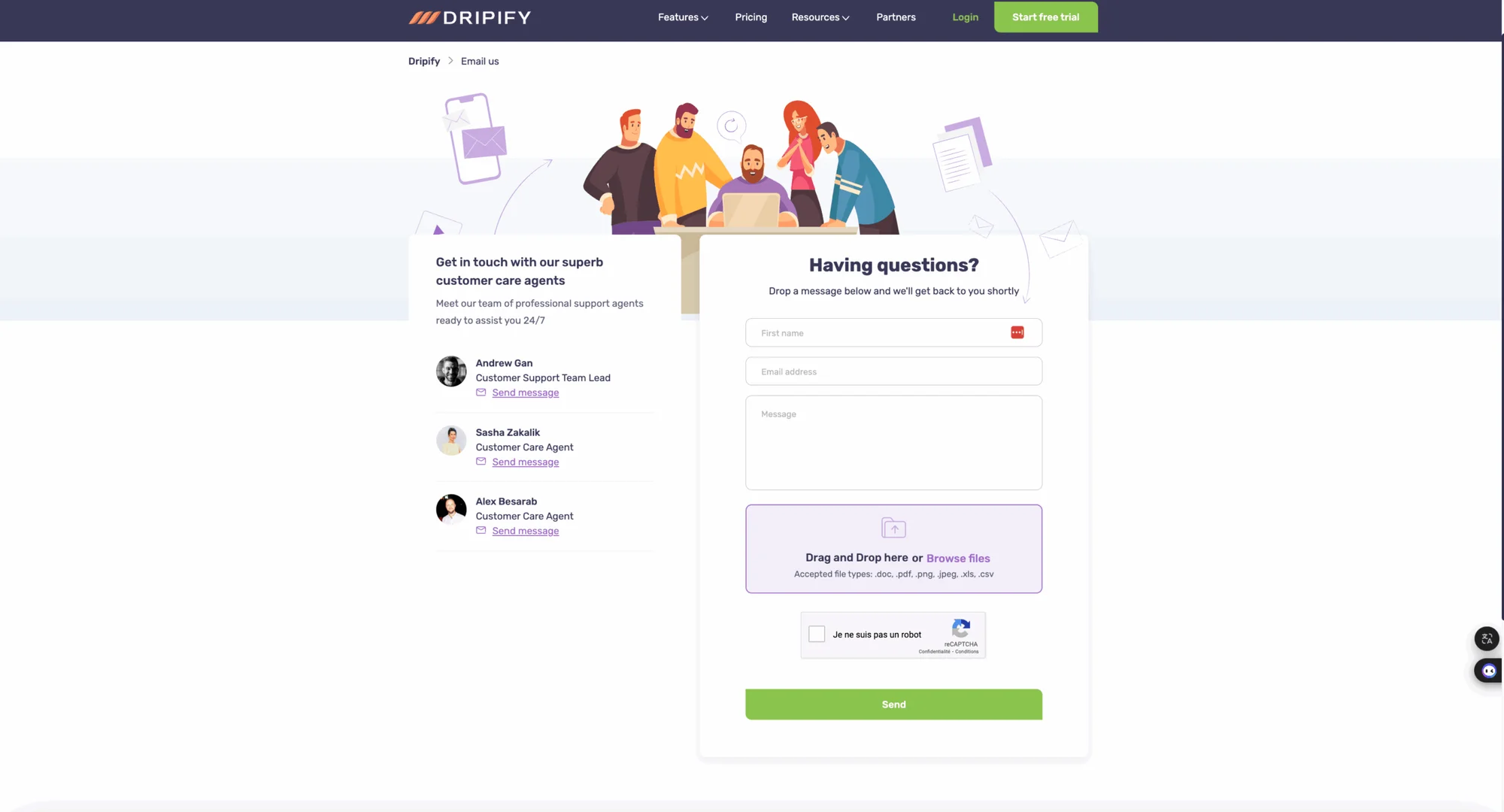
Unfortunately, the software, resources, and support are only available in English. 🇺🇸
On the other hand, here's what the tool does NOT offer 😔 :
🔴 E-book and Newsletter.
🔴 Public roadmap.
🔴 Email templates.
🔴 Community on social networks.
To recap, here's a new little comparison chart, special support, and resources. ⬇️
Details | Waalaxy | Dripify |
|---|---|---|
News/What's new? | ✅ | ✅ |
FAQ | ✅ | ✅ |
Newsletter | ✅ | ❌ |
Videos | ✅ | ✅ |
Blog | ✅ | ✅ |
Webinars | ✅ | ❌ |
E-book | ✅ | ❌ |
Public roadmap | ✅ | ❌ |
Social network presence | ✅ | ✅ |
Help Center | ✅ | ✅ |
Customer support | ✅ Chat, 5j/7 | ✅ Mail, 7j/7 |
Email templates | ✅ | ❌ |
Conclusion: Dripify vs Waalaxy, So Which One To Choose?
🥁 The verdict on this Waalaxy VS Dripify?
They're both companies offering a multichannel prospecting automation tool, but they don't have the same goals or the same kind of user experience. ❌
The choice depends on your objectives, your projects, and the strategy you want to implement. But also your personal preferences and expectations, as well as your profile and/or level of proficiency.💭
Waalaxy undoubtedly stands out, thanks to its great strengths:
🥇 Its intuitive interface is simple to get to grips with as well as easy to use.
🥈 Its variety of solutions to quickly and easily automate multichannel campaigns.
🥉 The support as well as the accessibility of content and resources.
🏆 The best customer support on earth.
Of course, we love the fact that it works even when your computer is turned off, thanks to the Cloud. 🥰
👉🏼 For its part, Dripify LinkedIn automation features help the tool to stand out by their completeness, as well as for the creation of customized sequences.
But its user experience remains rather weak, and customer reviews are quite divided. 🤷🏻♀️
Whatever platform you choose, the important thing is to make sure it aligns overall with your prospecting strategy. 🌌
To help you in your thinking, here's one last chart for the road, which summarizes pretty much everything we've mentioned in the article. ⬇️
Details | Waalaxy | Dripify |
|---|---|---|
Automated campaign | ✅ | ✅ |
Customized sequences | ✅ | ✅ |
Email search | ✅ | ✅ |
IA lead generation | ✅ | ❌ |
AI Writing Assistant | ✅ | ❌ |
Speed | 3,5s | 4,4s |
Email templates | In progress | ❌ |
Integration with third-party tools | ✅ | ✅ |
Cold outreach | ✅ | ✅ |
Multichannel prospecting | ✅ | ✅ |
A/B test | ✅ | ✅ |
LinkedIn & Email messaging | ✅ | ❌ |
Detailed statistics | ✅ | ✅ |
Ease of use | ✅ | ❌ |
Customer service | ✅ | ✅ |
Community | ✅ | ❌ |
Help Center | ✅ | ✅ |
Public roadmap | ✅ | ❌ |
💡 This isn't our first comparison! So, if you want to compare Waalaxy with other tools, we. have plenty of articles for you on the blog: LinkedHelper, Zopto, Powerin, LeadIn, etc.
FAQ: Dripify vs Waalaxy
Dripify.io is an English-language prospecting automation software, and you get a 7-day free trial.
But the lack of guidance in getting started may be a hindrance to understanding the various manipulations, especially if you're not comfortable with this kind of tool, which allows you to 🧐 :
Choose a default template and modify the actions, or create your own customized sequence.
You can also create LinkedIn profile visits and skills approvals.
From the dashboard, you have access to your statistics to assess impact and results.
What's more, managing multiple accounts can involve additional costs and complex logistics (no matter how comfortable you are), which is not the case with Waalaxy.
🪐 Waalaxy, on the other hand, has much more elaborate and advanced features, which are also much easier to use! You can:
Create fully customizable multichannel scenarios (LinkedIn + Emailing Marketing),
Improve prospecting through targeting, segmentation and list sorting.
Decide on the number/types of actions and the timeframe between them (for each campaign).
Never worry about your account security again, thanks to daily quotas (not used on Dripify).
ℹ️ Like most automation tools, Dripify VS Waalaxy uses information from the members of your LinkedIn network, i.e., names and e-mail addresses, positions held, and companies or locations (which may be of interest depending on your needs).
You can obtain this data in a CSV file by clicking on "Export" in the "View More" section of the Dripify dashboard. ⬇️
This same file can then be used on Waalaxy. From your dashboard, simply create and name a campaign, import the CSV file, and the data is then integrated directly. 🪄
That's it, you now know how to migrate from Dripify to Waalaxy!
In just a few clicks, you'll be able to start prospecting fearsomely on LinkedIn. 🚀
Here's what you need to consider when choosing your prospecting tool:
Features needed for your prospecting strategy, such as message automation, contact management, and integration with other tools (CRM, email, etc.).
Ease of use, which reduces training time and ensures rapid adoption by your team.
Integrations: Check that the tool can connect to your other software (such as HubSpot, Salesforce, or Google Sheets) for seamless data synchronization.
Security and compliance: Make sure the tool complies with current regulations (such as the GDPR) and provides robust security measures to protect your data and avoid restriction of your LinkedIn account.
Support and training: Choose a provider that offers good customer support and training resources (tutorials, webinars, etc.) to help you get the most out of the tool.
Cost: Compare prices and make sure the tool offers good value for the features and services provided.
By carefully evaluating these criteria, you'll be able to select a prospecting tool tailored to your company's specific needs.