
You sent an email and got radio silence? 👀 Now you’re wondering, should you follow up or give it more time? ⏳
Most of the time, sending a follow-up is absolutely worth it. But the way you follow up matters. The right wording can be the difference between getting a reply and getting completely ignored. 🥲
A lot of people default to “I’m reaching out again,” but that line can sound generic fast if it doesn’t match the situation. Whether you’re following up with a recruiter, client, or prospect, there are smarter ways to send a reminder email. ✉️
In this guide, you’ll learn how to send a reminder email that gets noticed, with 10 examples and simple tips to avoid common follow-up mistakes. ✨
What Is a Follow-Up Email & When Should You Send One?
A is a message you send to someone who hasn’t replied to your first email yet, with the goal of restarting the conversation or getting a response. ✉️
This can be about a job application, a proposal, a request for information, or even a sales outreach campaign.
This is usually the big question: when should you send a reminder email without sounding pushy? ⏳
Good news, there are a few simple guidelines. Here are the recommended timeframes:
After a job application: Wait 7 to 15 days.
After an interview: Follow up within 5 to 7 days.
After a quote or proposal: 3 to 5 days.
When prospecting (client/prospect): 2 to 3 days is usually enough..
Why does timing matter? Because the person you’re contacting is probably busy, distracted, or flooded with emails. A well-timed reminder email shows you’re organized and professional not impatient. ⏰
How to Send a Reminder Email: 10 Templates to Help You
Writing a reminder email can feel awkward. You want to follow up without sounding pushy, annoying, or overly formal. 😬
The good news? A well-written soft reminder or gentle reminder in mail can dramatically improve your chances of getting a response.
Whether you’re contacting a recruiter, client, prospect, or event attendee, the key is simple: keep your message short, clear, and helpful. The best email reminders feel natural, not aggressive.
To help you out, here are 10 ready-to-use templates you can personalize for any situation. 🤓
Template 1: How to Send a Reminder Email After a Job Application ?
You applied for a job and want to confirm your application was received. 😇
Template 2: Gentle Reminder Email After an Interview
You already spoke with the recruiter and are waiting for an update. 👀
Template 3: Kind Reminder Email After Sending a Proposal
You sent a quote or proposal and are waiting for approval. 😌
Template 4: Gentle Reminder Email for No Response
You sent an initial message or but haven’t heard back yet. 🥲
Template 5: How Do You Write an Urgent Reminder Email ?
You need an answer to keep moving forward. 📆
Template 6: How to Write a Reminder Email With Added Value ?
You’re following up while sharing something useful. 👩🏻🏫
Template 7: Sales Follow-Up Email After a Demo
You gave a product demo to one of your clients at an event.
Template 8: Gentle Reminder in Mail to Schedule a Meeting
You want to know if your prospect is truly interested, and for that, nothing beats a meeting. 🕺🏻
Template 9: Follow-up With a Data-driven Argument
You want to grab their attention with a concrete result (ROI, performance, etc.) so your solution is taken more seriously. 🤓
Template 10: How to Send a Friendly Reminder Email for an Event Invitation ?
You’re waiting for an RSVP confirmation. 😬
How to Write Reminder Email ? The 5 rules to follow
What really What matters most is how you structure your message. A good reminder email should be short, clear, and easy to reply to. ✉️
➡️ Here are the 5 simple rules to follow:
Keep It Short and Get to the Point: Your contact probably doesn’t have time to read a long email. In just a few lines, they should understand why you’re reaching out again.
Remind Them of the Context: Mention your previous exchange, the date, or the subject. This saves your contact from having to search for the information.
Give Them a Reason to Reply: Include something useful, details, , statistics, testimonials, etc. This gives them a real reason to reply.
Include a Clear Call to Action: Ask a simple question or suggest a next step. Example: “Would you be available for a quick 15-minute call this week?”
Watch Your Tone: Stay polite, professional, and positive. The goal is to follow up, not to pressure them.
How to Automate Reminder Emails ?
Sending reminder emails manually works… but it can get time-consuming fast. 😅 Especially when you’re following up with dozens of prospects, clients, or candidates. That’s where automation becomes a lifesaver. 👀
Today, you can automate your follow-up process with reminder email sequences.You write your messages once, then they’re sent automatically depending on whether the recipient replies or not. ✉️
➡️ For example:
A first email gets sent automatically.
A soft reminder email goes out 3 days later if there’s no reply.
A second, more direct follow-up is sent afterward.
What Tool Should You Use to Automate Reminder Emails?
If you want to scale your outreach without spending your whole day sending follow-ups, tools like Waalaxy can help. 😊 Waalaxy lets you automate reminder emails and LinkedIn follow-ups in just a few clicks.
Here’s what you can do with it 👇🏻:
Find professional email addresses from LinkedIn profiles.
Schedule multiple reminder emails in advance.
Personalize every message with variables like first name or company name.
Combine LinkedIn actions and emails into the same sequence.
Automatically stop reminder emails once someone replies, so your sales team can jump in.
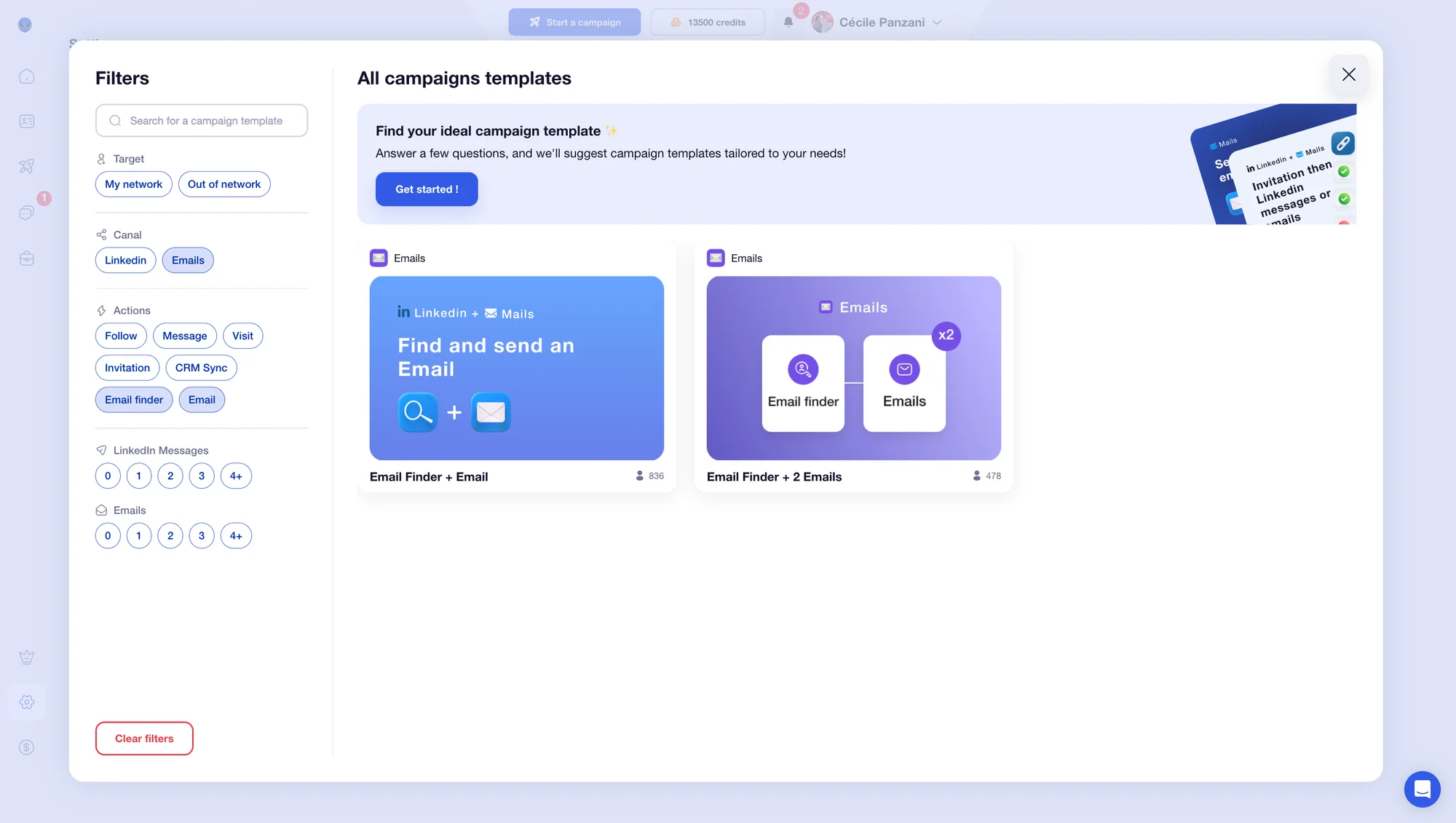
The biggest advantage? Everything is centralized and built to help you get more replies without adding extra work to your day.
You save time, avoid forgetting follow-ups, and increase your chances of getting a positive reply. 🕺🏻
Let’s Recap about How to Send a Reminder Email ?
As you’ve seen, the hardest part usually isn’t sending the first email… it’s sending the follow-up. 👀
Your message may have been opened at the wrong time, forgotten in a crowded inbox, or simply pushed aside. That’s why a well-written reminder email can make all the difference without sounding pushy or intrusive.
In the end, it’s not just about sending another “reminder sent” email. What really matters is:
The right timing. ⏳
Clear wording. 🗣️
A useful and personalized message. 🎨
Whether you’re sending a gentle reminder email, a soft reminder, or a more direct follow-up, the goal stays the same: restart the conversation naturally and make it easy for the other person to reply. ✉️
FAQ: How to send a reminder email ?
How Do I Politely Send a Reminder Email?
If you’re wondering how to remind someone politely email, the key is to keep your message short, friendly, and respectful. 👌
A polite reminder email should never sound demanding or passive-aggressive. Instead, briefly remind the person about the previous conversation, add context if needed, and make it easy for them to reply.
➡️ Here are a few simple tips:
Add value whenever possible.
Use a friendly tone.
Avoid sounding impatient.
Keep your reminder email concise.
15 Reminder Email Phrases You Can Use
If you don’t want every follow-up to sound the same, here are a few alternatives you can use in your reminder emails :👇🏻
"I wanted to follow up on my previous email ".
“I’m reaching out regarding…”.
“Just checking back in about…”.
“I wanted to circle back on…”.
“I’d like to reiterate my interest in…”.
"I’m following up to see whether you’ve had a chance to review…”.
“I wanted to see if you had any updates regarding…”.
“I’m reaching out again regarding…”.
“I’d love to hear your thoughts on…”.
“I’m checking in regarding…”.
“I’m writing to ask about the status of…”.
“I wanted to know whether you had time to look into…”.
“I’m contacting you regarding…”.
“Just a quick gentle reminder regarding…”.
“I wanted to reconnect about…”.
What Subject Line Should You Use for a Reminder Email?
Your subject line is often what determines whether your email gets opened or ignored. 👀 A good reminder email subject line should be easy to understand at a glance, short and clear.
Ideally, avoid overly generic subject lines such as "Follow-up" or "I’m reaching out again". Instead, try something more specific :👇🏻
“Following Up on Our Discussion About (Topic)”.
“Did You Get a Chance to Review (Document)?”.
“Quick Update Regarding (Project)”.
“What Are Your Thoughts on (Topic)?”.
“Gentle Reminder About (Topic)”.
How Do I Send a Reminder Email After No Response?
If a prospect isn’t responding, avoid sending the exact same message again. 😬
They haven’t had time.
Your message wasn’t clear enough.
They didn’t see any immediate benefit.
➡️ To improve your chances:
Keep your message short.
Provide new information (a figure, a benefit, etc.).
Ask a simple question.
You can also switch channels by reaching out on LinkedIn or via phone to increase your chances of getting a response.
When Should You Stop Following Up via Email?
In most cases, 2 to 3 follow-ups are enough. After that, you risk sounding pushy or worse, damaging your reputation. 😬
👉🏻 A simple follow-up structure usually works best:
Initial email.
One gentle reminder email.
One more direct follow-up.
Optional final “closing the loop” email.
If you still haven’t heard back after that, it’s best to move on. Sometimes, no reply is the reply. 🙃
Should You Reply to the First Email or Create a New Message?
In most cases, it’s better to reply to the first email. Why?
Because it allows you to 👇🏻:
Keep the context visible.
Automatically remind the recipient of your initial message.
Make it easier for the recipient to read.
On the other hand, you can create a new message if the subject has changed, you’re changing your approach, or your first email was too long or confusing. 😕
In any case, the important thing is that your follow-up is clear, short and easy to understand. ✉️
Now you know everything about how to send a reminder email. 🧚🏻♀️