
You're probably comparing Linked-Helper and its alternative Waalaxy for your prospecting activities, aren't you?
Today, we're going to take a detailed look at the features of these two tools, their similarities and their differences, to help you choose the one that best suits your needs.😉
➡️ Contents :
Introducing Waalaxy and Linked-Helper.
Comparative analysis of their functionalities:
Automated prospecting campaigns.
Personalization of prospecting messages.
Response and engagement tracking.
E-mail finder comparison.
Inbox comparaison.
Connection and compatibility with other tools.
Simplicity of use and user interface.
Available resources and support.
Customer feedback and market positioning.
Let's compare Waalaxy and Linked-Helper! 🚀
Introducing Linked-Helper
Linked-Helper is a prospecting tool for LinkedIn. 🔍
The latter is in the form of an application. Linked-Helper is a seven-year-old American company specializing in automatic prospecting.
Linked-Helper stands out for its wide range of functions and its ability to personalize . This tool requires some basic automation skills. 📈

Here's an overview of Linked-Helper's features:
🟣 Automation of LinkedIn prospecting campaigns.
🟣 LinkedIn messaging to simplify and optimize the management of your exchanges.
🟣 Extract professional emails from leads using the "Email Finder" tool.
🟣 Message personalization.
🟣 Automatic import of leads.
🟣 Connection with CRM and integrated CRM.
🟣 Adding extensions.
Linked-Helper targets sales reps, recruiters and marketers 👀
What customers think of Linked-Helper
💚 Here's the positive feedback on the tool:
The 14-day free trial. 💰
The resources on offer are comprehensive (although only available in English).
Saving time.⌛️
Customer support is efficient.
Transferring a license from one account to another.🙌🏻
The ability to create your own personalized campaign from A to Z.
sources : Capterrra and Google avis


🚩 However, there are a few false notes:
The sheer number of features means a longer learning curve. And not all of them are very useful. 😔
You can find e-mails, but you can't send them.
The user interface is not visually appealing.
You need to have your computer on for the application to work. 👩🏻💻
It's not intuitive.
The inbox loses its usefulness if it is not synchronized with LinkedIn. 📩
Unimposed limits put us at risk of banishment.
source : Capterrra


🧡 Here are some suggestions for improvement made by customers:
Add A/B testing.
Add AI. 🤖
Send e-mails.
Linked-Helper Pricing
Linked-Helper offers a trial period followed by a subscription starting at $15 per month. 💸

Introducing Waalaxy
Waalaxy is a tool designed to automate your LinkedIn and e-mail prospecting campaigns. 🛸
Also available as a Chrome extension, this tool offers an efficient, intuitive solution that requires neither a pre-existing database nor specific technical skills. 😇
💡 With Waalaxy, you can send up to 200 invitations per week, or around 800 invitations per month.
Most of the tools available on the market are aimed at experienced profiles, and are often complex due to their many features. 😅
Waalaxy stands out as the simplest solution on the market. 🛸
If you're looking for a tool that's as easy to use as it is powerful, you've come to the right place! 😇

Here's a quick overview of Waalaxy's key features:
🟣 Connection with third-party tools such as HubSpot, Salesforce, NoCRM, Zoho, etc.
🟣 LinkedIn messaging to simplify and optimize the management of your exchanges.
🟣 Extract professional emails from leads using the "Email Finder" tool.
🟣 Automate the sending of cold emails.
🟣 Using AI to find prospects.
🟣 Automated campaign launch.
🟣 Automatic import of your customers.
Waalaxy is aimed at sales and marketing professionals, managers, recruiters and agencies 😉
What Waalaxy customers think
💚 Here's the positive feedback on the tool:
The free version for life.
Its intuitive, easy-to-understand platform. This is the BIG plus point of the solution. 🧘🏻♀️
The direct availability of sequences and templates in the interface, organized by category from beginner to expert, is very practical.
Support for 11 languages on the interface and blog, reaching a global audience. 🗺️
The autonomous universe created by Waalaxy, transporting users into a unique experience.
AI is an asset that saves even more time.⌛️
The resources available are comprehensive and really help.
The ability to send voice notes means you can connect more quickly with your targets 🗣️.
Sources: Trustpilot and Google avis


🧡 Here are some suggestions for improvement made by customers:
Make the plugin usable on browsers other than .
Develop a mobile version to enable launch and tracking from anywhere. 📱
Introduce new options to make your canvassing even better.
In short, Waalaxy is suitable for beginners and advanced users alike. It's a solution that's both powerful and intuitive at the same time, according to feedback from customers who consider it the best LinkedIn automation tool. 🤩
Want to discover the world of Waalaxy? Click here! 👇🏻
Waalaxy Pricing
Waalaxy subscription starts at €0 per month. 👀
[waalaxy_price_table]
What are the similarities and differences between Waalaxy and Linkehelper?
Before deciding which tool best suits your strategy, it is essential to discover the different features and choose the method that resonates most with you! ⬇️
1) Creating automated campaigns
So that you have all the cards in your hand when choosing your tool, we explain how to do it! 👀
The Waalaxy example
To start your campaign, click on « Create a campaign ». You'll be taken to a world of opportunities, where you can take control of your campaign! 🛸

When you're ready to get started, you'll have several options to choose from:
1️⃣ "Beginner": perfect for beginners, these sequences are simple to use and include basic actions such as invitations, messages or visits.
2️⃣ "LinkedIn": these more advanced sequences focus specifically on actions taking place on LinkedIn (visit + invitation + message).
3️⃣ "LinkedIn + Email": these sequences combine actions on different channels, both on LinkedIn and by email (visit + invitation + search for email address).
The sequence classification is designed to help you make choices throughout the process: 👇🏼
Each sequence is associated with a level of difficulty, allowing you to progress and avoid taking steps that could prove more complicated than expected. 🫠
They are also grouped by theme (promotion, recruitment, networking, affiliation, etc.) to help you select those best suited to your objectives (lead generation, etc.).
Last but not least, an overview by theme and difficulty lets you see all the possibilities.

You can also use the filters in your search for the best sequence! 🗺️

For our example, we'll use the "Invitation + 2 messages" sequence.
You can give it a name of your own - it's an optional step, but a handy one to avoid getting lost in all your campaigns! 🧭
Next, you can import prospects in different ways:
🥇 From your lists (if you've already used the tool).
🥈 By auto-import (automatic collection of contact data from a LinkedIn account and addition to Waalaxy).
🥉 Directly from (via Google Chrome extension).

Once your leads have been imported, you can add a note to the invitation you send (bearing in mind that an invitation without a note increases your chances of acceptance by 10%).
You must also define the waiting time between the acceptance of the invitation and the sending of the next action (from 0 to 28 days). 📆

After setting up a campaign on Linked-Helper, we'll continue by personalizing the messages. Each to his own! 👀
The Linked-Helper example
Once you've downloaded the application from the website, you can configure it by connecting to your LinkedIn account (dark blue). Once downloaded, a "new" application will appear (light blue). You'll then be taken to the home page, where you'll notice that it's only available in English. 🇬🇧

The “Create campaign” button is easily found in the menu.
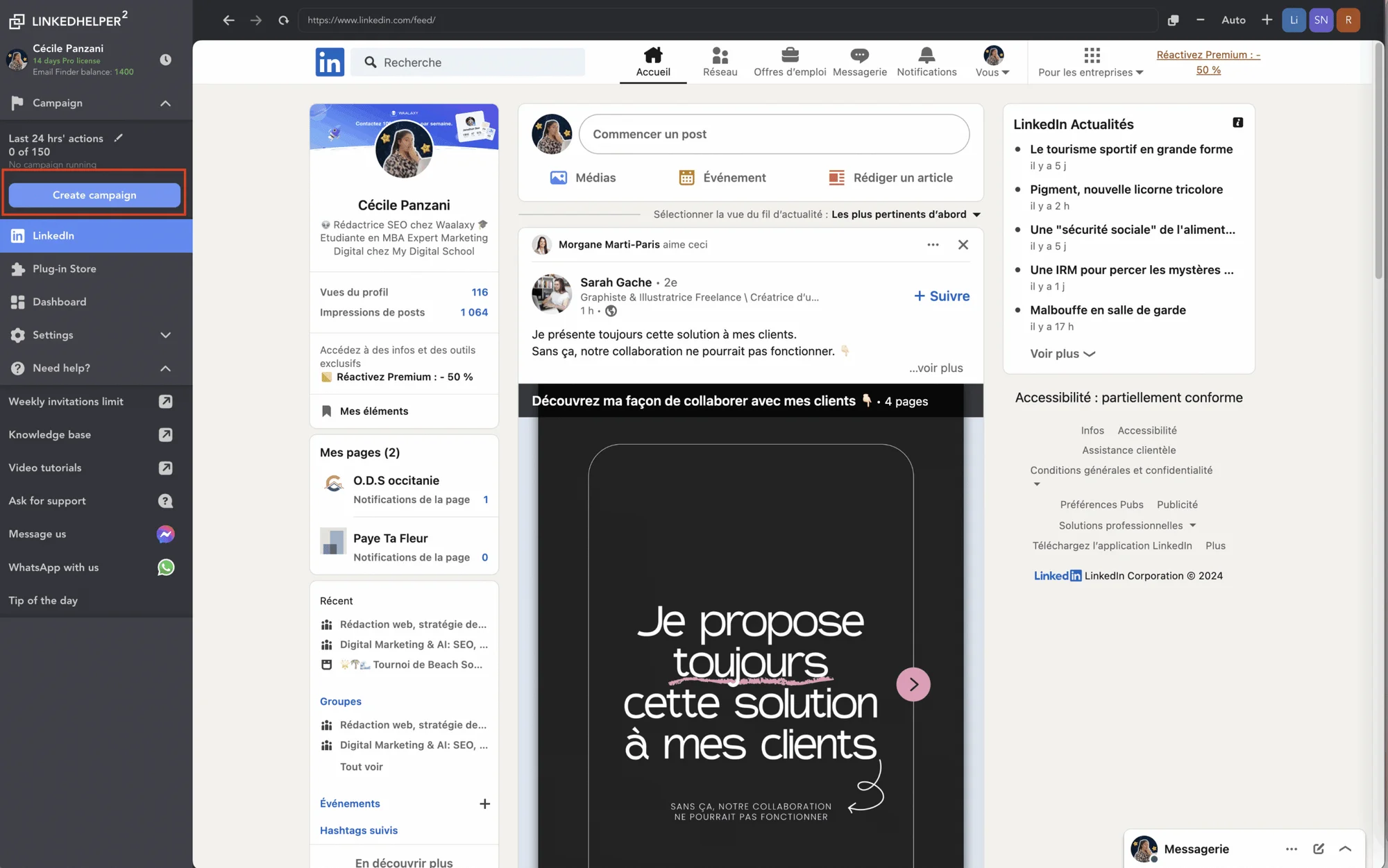
🧭 On first use, an onboarding pop-up opens and guides us through the creation of our campaign :
Step 1 : Creating the invitation message. As said before, we advise you not to put any in order to increase your acceptance rate. 🍀
Step 2: Automatically delete people who have not accepted your invitation.
🚨 Be careful with this step! The function is retroactive. In other words, it will delete people you invited before the launch of your campaign.
Here you can decide to :
🚮 Delete function.
📆 Choose, after how long, you want to remove people from the list.
Step 3 : Writing the first message.
We'll come back to the subject of message customization later. 👀
Step 4: Writing the reminder.
➡️ Here you can choose whether or not to send the dunning message.
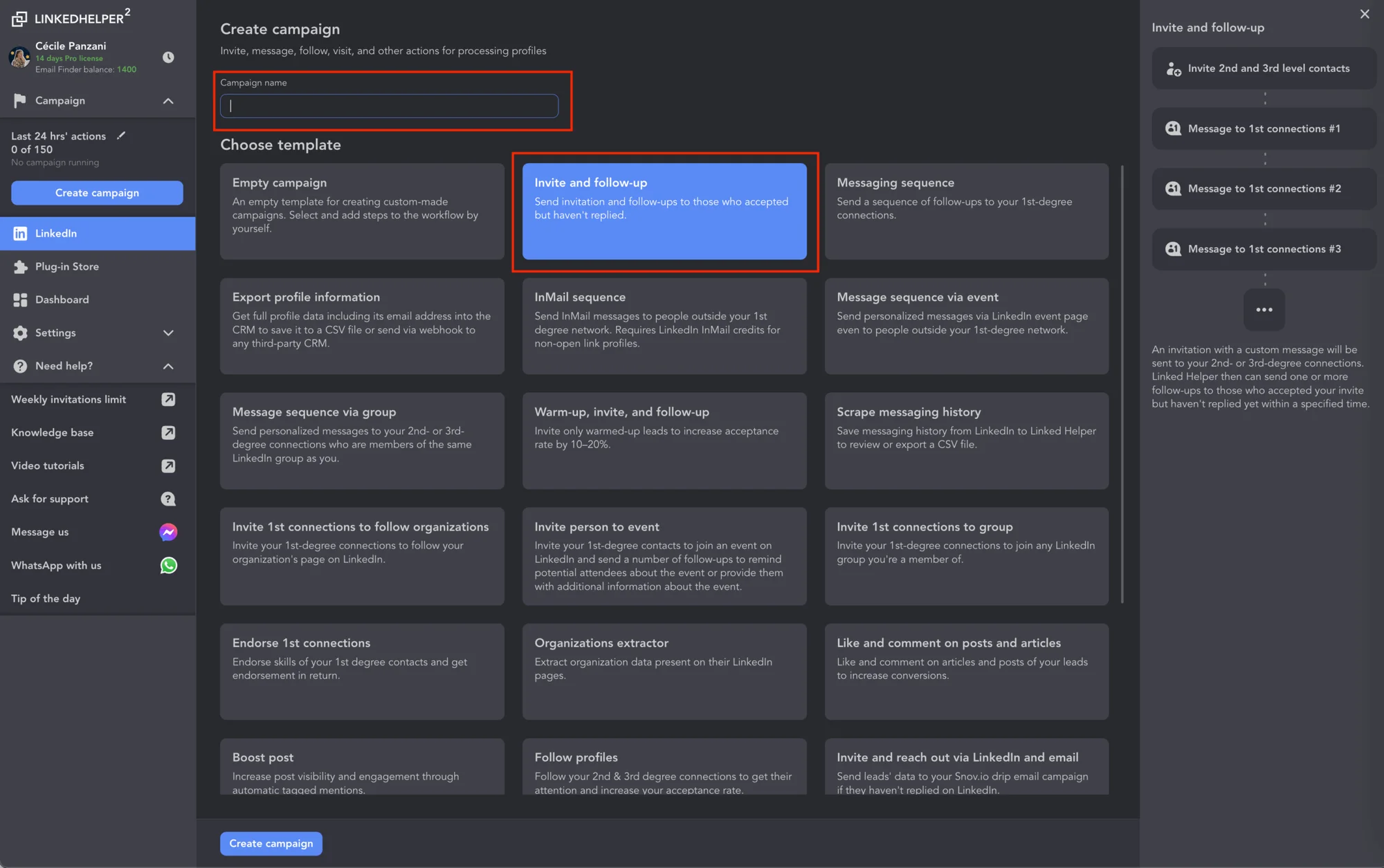
🧐 For your next creation, the process is a little different. To launch a campaign, just click on the "+" in the menu.

Next, we need to name and choose the type. I've chosen "Invite and follow". The workflow is explained. However, it's not definitive. It can be modified, steps removed or added, but it's only a model. You can also define its purpose. 🎯
On the side is a diagram of the campaign and an explanation of its purpose. What is it for? Who is it for? Ect.
Before we go any further, here's a quick comparison 👇🏻 :
Features | Waalaxy | Linked-Helper |
Automated campaign creation | ✅ | ✅ |
Message personalization | ✅ | ✅ |
Integration of other tools | ✅ | ✅ |
E-mail Finder | ✅ | ✅ |
Send personalized e-mails | ✅ | ❌ |
Library of e-mail templates | In progress | ❌ |
Creating prospect lists | ✅ | ✅ |
A/B test | ✅ | ❌ |
Import leads from LinkedIn | ✅ | ✅ |
Import leads from other sources (CSV file) | ❌ | ✅ |
Use case-based campaign templates | ✅ | ✅ |
Automatic tracking and reminders | ✅ | ✅ |
Export leads to Excel spreadsheets | ✅ | ✅ |
Compatible with Sales Navigator, Recruiter | ✅ | ✅ |
2) Personalizing prospecting messages
Now that your campaigns have been set up, let's move on to writing the messages! 📝
With Waalaxy
To avoid repetition and input errors, you can automatically add your own template to those already available on the site, and reuse it later. 😉
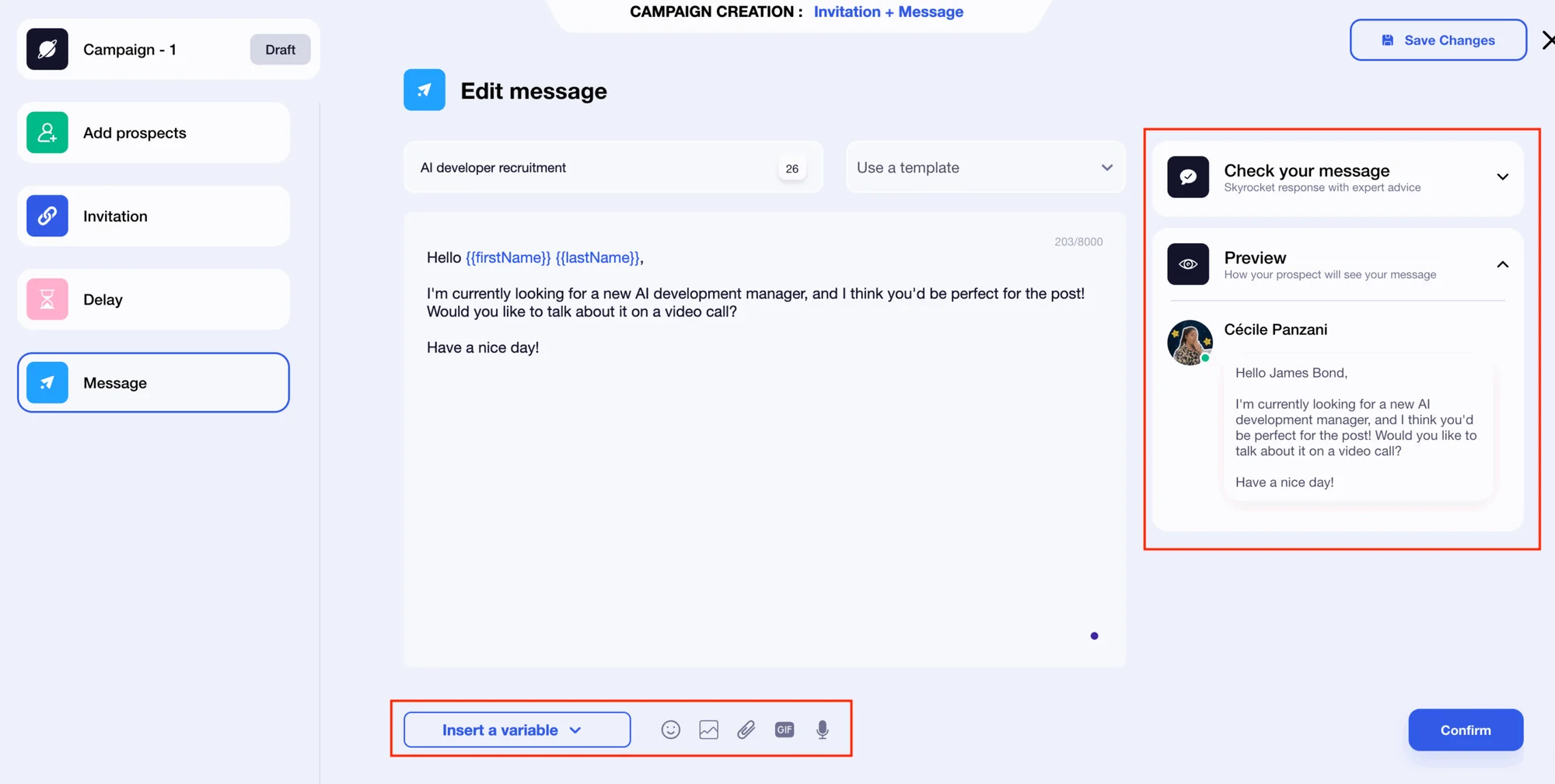
You are free to optimize it by including different elements in your text:
*️⃣ Variables (first name, last name and company).
📸 Images.
🔗 Attachment.
📹 Gifs.
🗣️ Voice notes.
🤖 AI assistant for a top message (coming soon).
➡️ To help you write :
A checklist with tips on what to include and what to respect when writing your message.
Preview your writing to check the final result!
Do you like your message? Great! You can confirm to access the checklist. All you have to do is launch it. 🚀

With Linked-Helper
➡️ Once you've made your choice, you can personalize your messages.
There are no fewer than 11 variables, including :
“First name”, prénom.
“Last name”
“Compagny”, the company.
“Position”, your prospect's post...
As with Waalaxy, you can save your messages as a template. A preview is also available to check that it's up to scratch! 👌
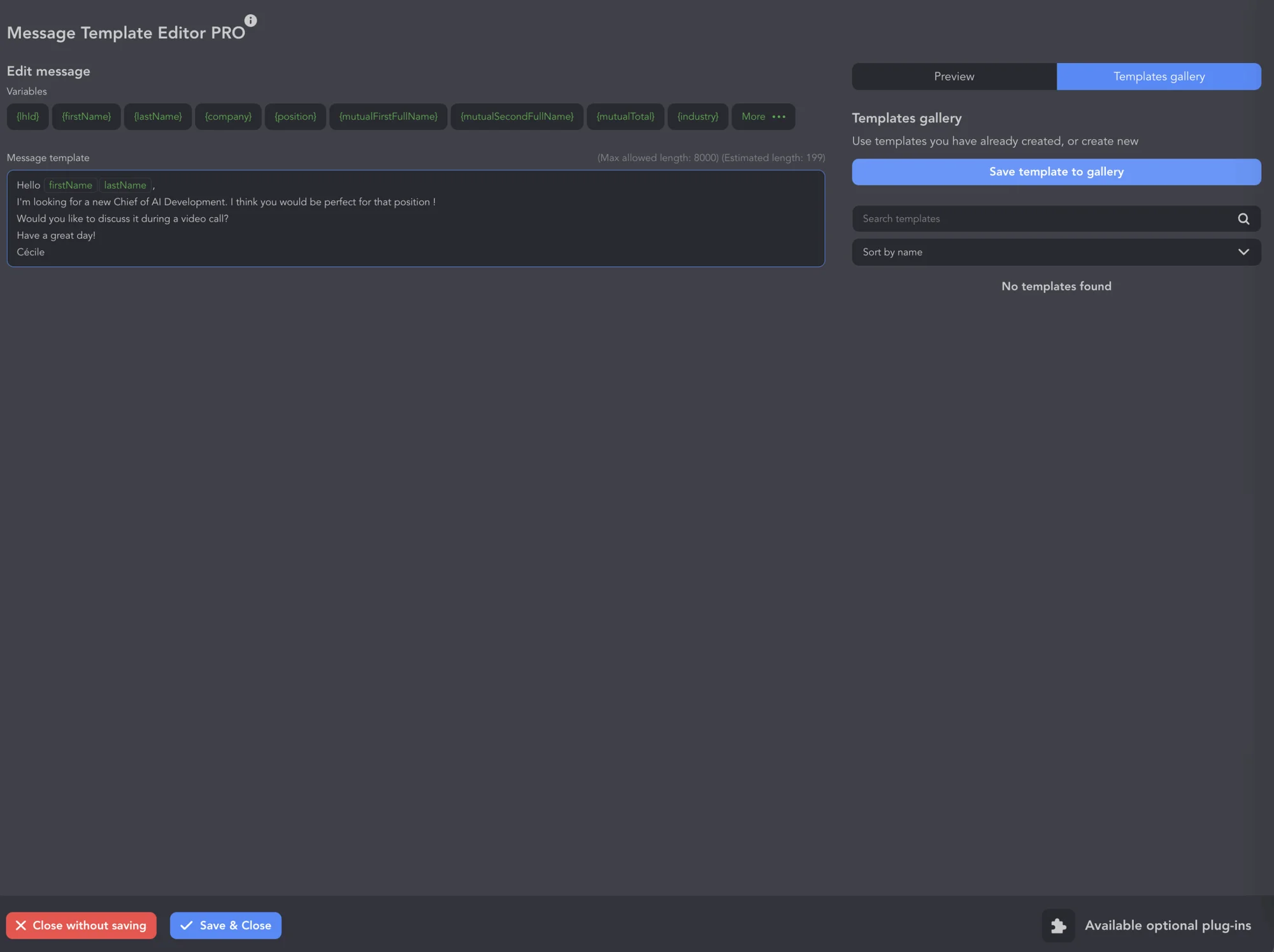
➡️ You can access other variables by downloading one of the many available extensions.
Then, we have access to the "Workflow" to add our leads, and we can modify the template if we wish. This vertical view makes it easy to understand the different stages 😉
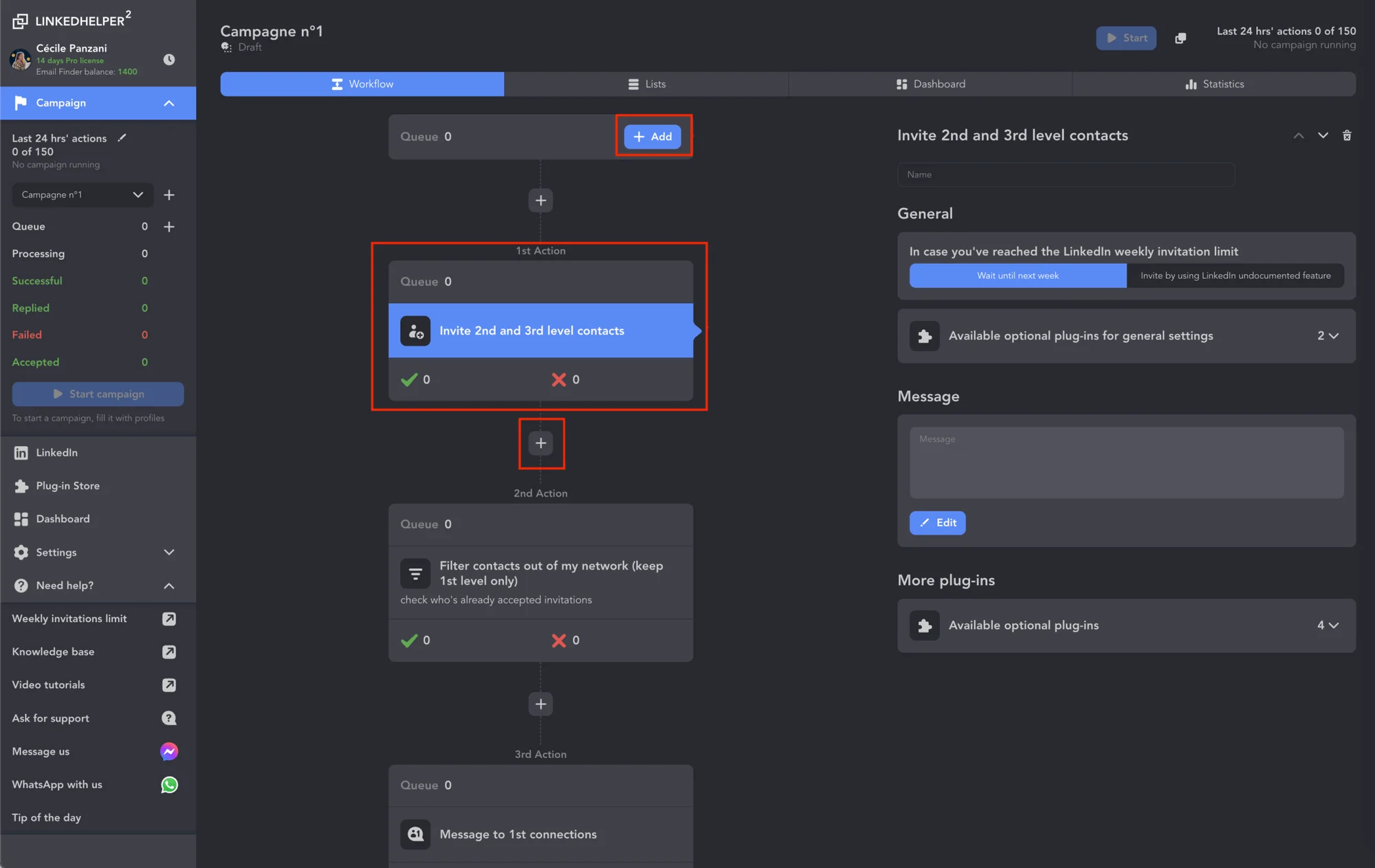
First, we add our prospects. We can add them from different sources:
👉🏻 Directly from LinkedIn.
👉🏻 Download profile URLs.
👉🏻 Download from Linked-Helper CSV.
👉🏻 List of customers already collected.
In this case, we have chosen to extract them from LinkedIn's “search page”.
The application displays our LinkedIn interface, and we can apply filters as usual. Once finished, click on the triangular icon. From there, it will come to collect profiles on LinkedIn.

🚨 Be careful, the software will recover all the profiles, you will have to click on “ Stop Execution ” if you want to avoid ending up with 1000 people to re-sort.🥲
Once collected, they can be found in “ Lists ”, where they can be filtered before the campaign is launched. 🙌🏻
Once launched, we have a window that allows us to see in real time how our campaign is progressing! 😌
Our little summary table 👇🏻 :
Element | Waalaxy | Linked-Helper |
Variables | ✅ | ✅ |
Liquid syntax | ❌ | ✅ |
Images | ✅ | ✅ |
Attachment | ✅ | ❌ |
GIF | ✅ | ❌ |
Voice notes | ✅ | ❌ |
Writing tips | ✅ | ❌ |
Template | ✅ | ✅ |
Overview | ✅ | ✅ |
IA | ✅ | ❌ |
3) Tracking responses and engagement rates
Once you've launched your campaigns, it's vital to your strategy to examine the results! But how? That's what we're going to look at. 👀
With Waalaxy
When you're on the home page, you'll discover a dashboard displaying the statistics for your analysis. Statistics are grouped according to the channel used:
📊 LinkedIn results (blue box).
📊 Email results (purple box).
What's more, you can apply two filters to refine your analysis:
1️⃣ Launch periods.
2️⃣ Select the campaign to be displayed.

Each box highlights two key indicators decided upon by Waalaxy: number and response rate. ✨
To track your LinkedIn campaigns, you have 3 different boxes, further down the page, depending on your campaign choice:
1️⃣ Invitations accepted and acceptance rate.
2️⃣ Messages answered with response rate.
3️⃣ Details in graphical form (with the option of downloading data in CSV format).
For e-mailings, other indicators are available:
Delivered and deliverability rate.
Responses and response rates.
Undelivered and bounce rate.
💡 In addition, you can view the statistics (LinkedIn and Email) for each of your campaigns in the dedicated “statistics” section.

or those with a passion for statistics, the "Staff" section may also be of interest to you. 👀
Inside, you'll find an overview, including :
Details of prospects by level.
The name of each lead, along with :
Stage.
Status.
Lead list.
Import type.
Tags.
Filters for sorting by import type, stage, status or tags. 📊

With Linked-Helper
Here, the results are not displayed directly on the home page. Select the campaign of your choice from the side menu. You'll then have access to :
1️⃣ To the Dashboard.
2️⃣ To the various statistics (it should be noted that these are not in percentages).
On these pages, you can choose :
📆 The period.
📊 Download data.

You can also access Datas via the main menu by clicking on “Dashboard”.
On this page, you will have access to filters:
1️⃣ Period
2️⃣ Category
You can also download the data. 📊

There's a lot of data, but the main ones are well highlighted, making analysis easy! 👀
As usual, here's the comparison 👇🏻 :
Functionality | Waalaxy | Linked-Helper |
Home page data | ✅ | ❌ |
Home page filters | ✅ | ❌ |
Customize a page with selected data | ✅ | ✅ |
Separate KPIs by source | ✅ | ✅ |
Get an overview of our campaigns | ✅ | ✅ |
Suitable for beginners | ✅ | ✅ |
4) E-mails Finder comparison
Both of the tools we're looking at offer E-mail Finder functionality. To assess their respective performance, we carried out a test on 120 profiles to determine which of them is the most effective at collecting e-mail addresses. 📧
The results are clear: 43.3% for Waalaxy versus 21.6% for Linked-Helper 🙄
The proof in the pudding 😇 :
Waaalxy: 52 addresses found! 😉

Linked-Helper: 26 addresses. 😕

5) Inbox comparison
What is Inbox? It's a messaging system that simplifies and streamlines the management of your conversations. It enables you to increase your conversion rates and improve your customers' experience. It's halfway between your tool and your CRM. 👀
How does Waalaxy work?
With the Waalaxy inbox, you can :
Automate reminders for a specific date. Synchronize automatically with over 2,000 applications.⏱️
Optimize the personalization of your communications with custom variables, tags and notes.🤩
Reply in 10 times less time than with conventional messaging, thanks to pre-recorded messages and keyboard shortcuts.🏃🏻♀️

LinkedIn messaging is a separate feature of Waalaxy. So you don't need a subscription to take advantage of it! It automatically synchronizes with your account in just a few moments. You'll find all your conversations directly in your Inbox 📨
What's more, there's no risk to your LinkedIn account, “Inbox Waalaxy” behaves exactly like the original messaging vis-à-vis LinkedIn. The difference lies in the interface and additional functions, which do not generate any prohibited behavior.💚
How does Linked-Helper work?
Linked-Helper's inbox is directly included in the application. All you need to do is download the dedicated extension.
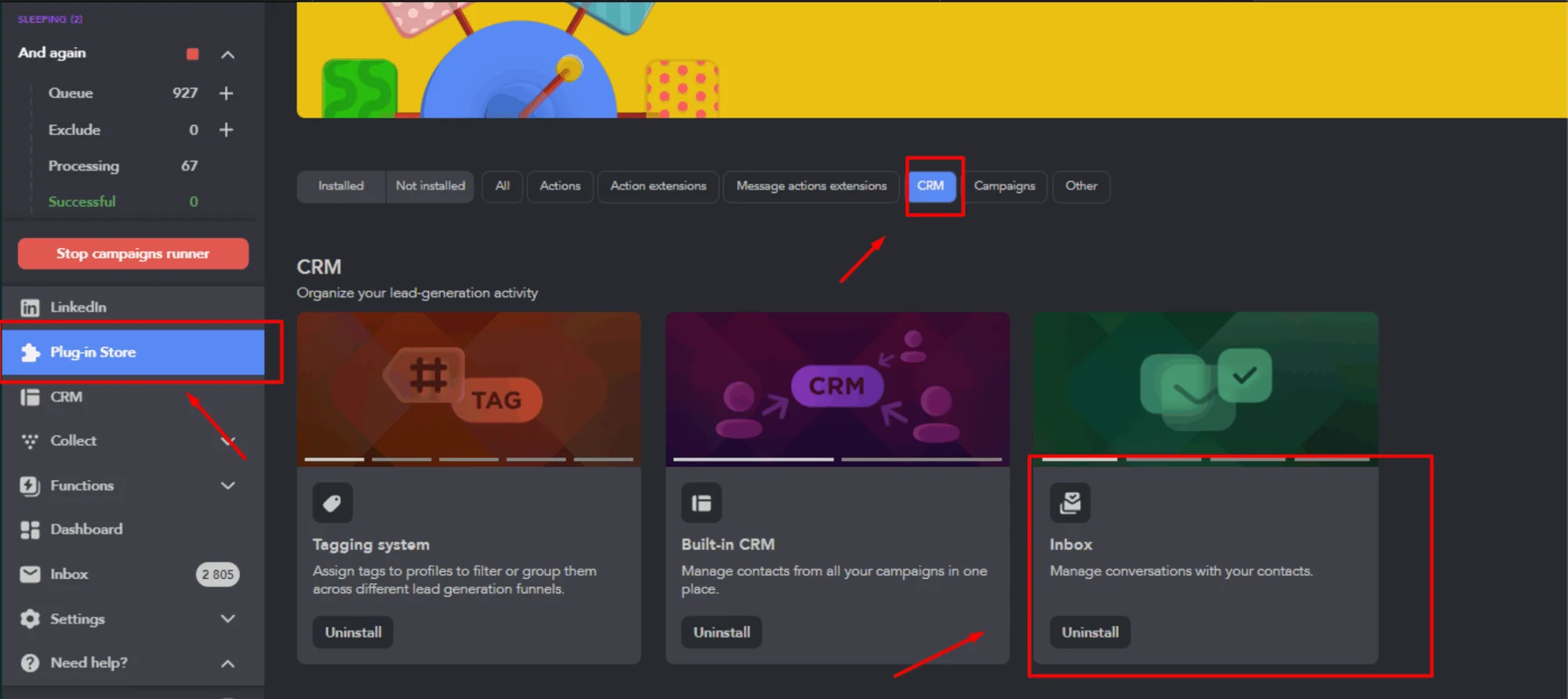
Once installed, it can be found in the main menu.
Inbox has just been updated. It now allows you to reply to messages. 🎉
🚨 However, unlike Waalaxy, the latter does not synchronize with our LinkedIn conversations. Messages only appear in the inbox when one of our campaigns runs the "Check replies" action. If we have one in progress with this action, then the application will keep the entire message history up to date.
So you don't have access to all your LinkedIn conversations 🫤.
Our chart récap👇🏻 :
Inbox features | Waalaxy | Linked-Helper |
|---|---|---|
Respond to campaign messages | ✅ | ✅ |
Automate responses | ✅ | ❌ |
Personalize messages | ✅ | ✅ |
Synchronization with LinkedIn | ✅ | ❌ |
Risk-free | ✅ | ✅ |
Free | The beta version | ❌ |
Manage multiple accounts | In progress | ✅ |
Mobile version | In progress | ❌ |
Subscription separate from original tool | ✅ | ❌ |
Inbox customer support | 6/7J | 7/7J |
6) Connection and compatibility with other tools
To take full advantage of all available functions, you can connect your software to CRM (Customer Relationship Management) systems.
Let's take a look at how to proceed. 👀
How do I use Waalaxy?
This step is dreaded by many on the majority of automation interfaces on the market 😰.... But don't worry: with Waalaxy, you can easily connect to the following CRMs: 👇🏼
Hubspot.
NoCRM.
Pipedrive.
Salesforce.
Zoho.

Wait, there's more! You can also integrate the following software directly into your campaigns: 👇🏼
Airtable.
Sendiblue.
Sellsy.
Axonaut.
Google Sheets.
👑 And to top it all off, you'll discover that synchronization is easy to understand and use thanks to our dedicated article!
All you have to do is take the plunge! 😇
How do I use Liked-Helper?
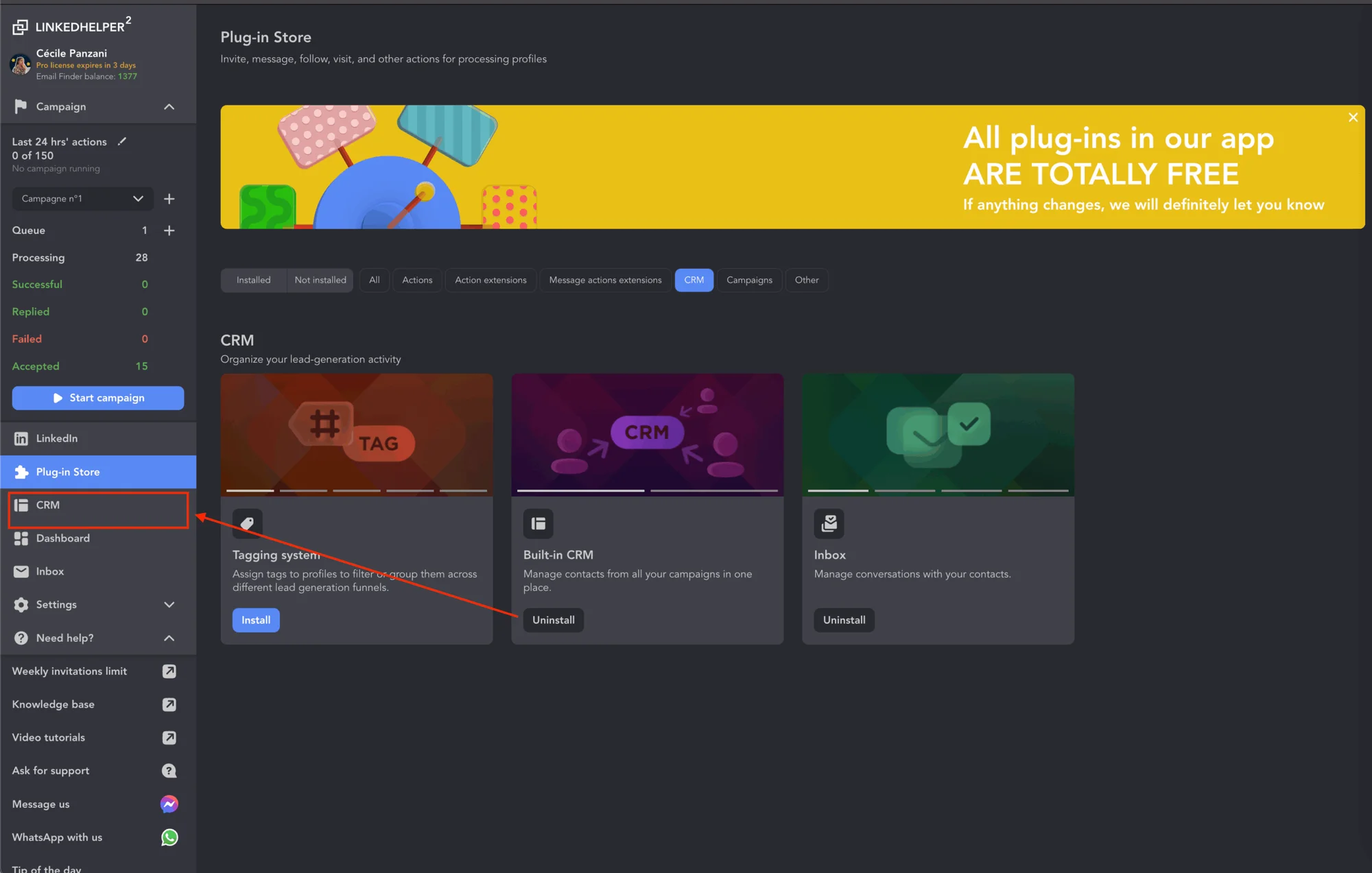
There are several ways to connect to a CRM. The first is to download an extension.
Once downloaded, it appears in the main menu. This is an integrated CRM. It's quite simple: all our leads from our various campaigns are added directly, and we can filter and download them as we like.
Profiles can be tagged to track :
Actions taken.
The campaigns to which the leads belong.
It is also possible to connect to other CRMs via two extensions:
➡️ " Send a person to webhook ". All profile information can be sent from any stage via a webhook to any other CRM:
HubSpot.
PipeDrive.
SalesForce.
Google Sheets or Google Mail.
Other systems support incoming webhook integration or via services such as Zapier
➡️ " Send person to external CRM ".
This action allows you to send all profile information extracted by Linked Helper to one of the external CRMs with which the tool is integrated.
The advantage of this “ Send person to external CRM” action over "Send person to webhook" is that you don't need to have a separate subscription for an external service like Zapier. 😌
🚨 We note that having three extensions for CRMs can create confusion and make use more complex.
7) Ease of use and user interface
It's time to explore accessibility and ease of use. This is what will determine whether you adopt a tool for good (or not)! 🫠
For Waalaxy
Waalaxy's clear, intuitive interface is immediately appealing. The consistency of its graphic charter, coherent pictograms and pleasant, matching colors instantly facilitate navigation and understanding of the different sections. 😇

In the end, having explored the entire interface, it's clear that Waalaxy has focused on visual consistency for ease of use!
For example, in your prospect lists, you'll notice a color scheme for status and action icons:
🩶 Grey: not connected.
🧡 Orange: waiting.
💙 Blue: connected.
💡 To help you, a description of each icon appears when you hover your mouse over it.
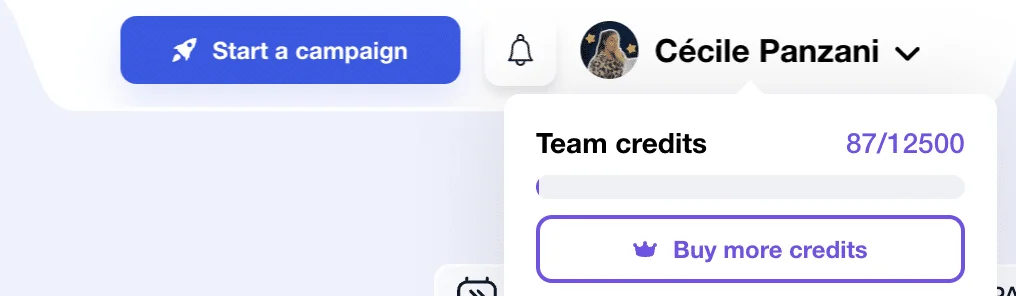
As far as"Email Finder" is concerned, Waalaxy uses credits. To find out how many you have left, just click on your name. This gives you quick access to your quotas! 👀
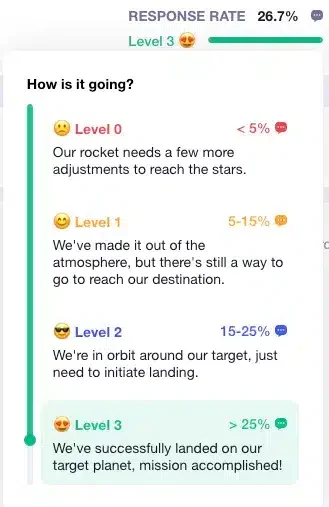
We'll say it again, but Waalaxy's main advantage is its simplicity! No more headaches. For example, thanks to a rating system ranging from 1 to 3, you can see at a glance where your campaign stands in terms of performance! 😉
For Linked-Helper
The interface is very dark, classic. There are hints of red 🟥, green 🟩 and their famous blue 🟦 found on their site and logos. Regarding the menu, the essential elements present. It doesn't retract. The whole is rather coherent, though not very visual.
What's more, there's no real home page on the campaign creation software.😔

User experience is another story...🥲
In fact, it's quite complicated to use. There are a huge number of functions linked to extensions, so the learning curve is long. What's more, it's not very pleasant to search for a function only to find that you have to download an additional extension...
We need to improve onboarding so that you don't feel so lost. That would make it more intuitive 💡
Secondly, it's a local application, so you need to leave your computer on if you want your campaigns to run.🙄
Finally, the limits for sending messages are not activated. You must take this step or risk being banned from LinkedIn.⛓️
Overall, it's a rather average experience, as it's full of pitfalls. Fortunately, there are a number of resources to help us! 🙌🏻 Before you discover them, you know the drill:
Here is our récap👇🏻:
Functionality | Waalaxy | Linked-Helper |
Accessible in French | ✅ | ❌ |
Intuitive interface | ✅ | ❌ |
Consistent graphic charter | ✅ | ✅ |
Retractable menu | ✅ | ❌ |
Accessible reception campaign | ✅ | ✅ |
Ease of use | ✅ | ❌ |
8) Available resources and media
Every user wants to have everything they need at their fingertips, so they can use the tool on their own, without having to call customer support every two minutes!
So let's take a look at the different resources available from our two solutions and judge their quality. 🩼
At Waalaxy
You don't have to look far, as many useful resources are directly accessible from the interface menu:
🔔 What's new: keep up to date with the latest industry news and developments.
❓ FAQ: if you need something, just type in what you're looking for or your question, and the search engine will suggest specific articles.

What's more, customer support is highly responsive and available Monday to Friday from 8:30 a.m. to 6 p.m. 👀
⚠️ Before contacting him, take a look at the problems encountered by other users and the clear, precise answers provided (with videos).
📚 Feel free to browse the hundreds of articles available on the blog and Help Center for help and advice on using the tool!

And that's not all! 😮💨 If, despite all these resources, you still can't find what you're looking for, you can join a public Facebook group (+4000 members) that aims to share best practices, techniques, etc.
If you would like even more content :
💌 A weekly newsletter: Supernova.
🎬 A YouTube channel.
👀 A blog with hundreds of articles (LinkedIn, marketing, emailing ...)
🎥 Webinars.
📘 An e-book: "7 sample prospecting messages to boost your response rate".
📲 Our social networks: LinkedIn, Instagram, YouTube (available in FR, US and ES).
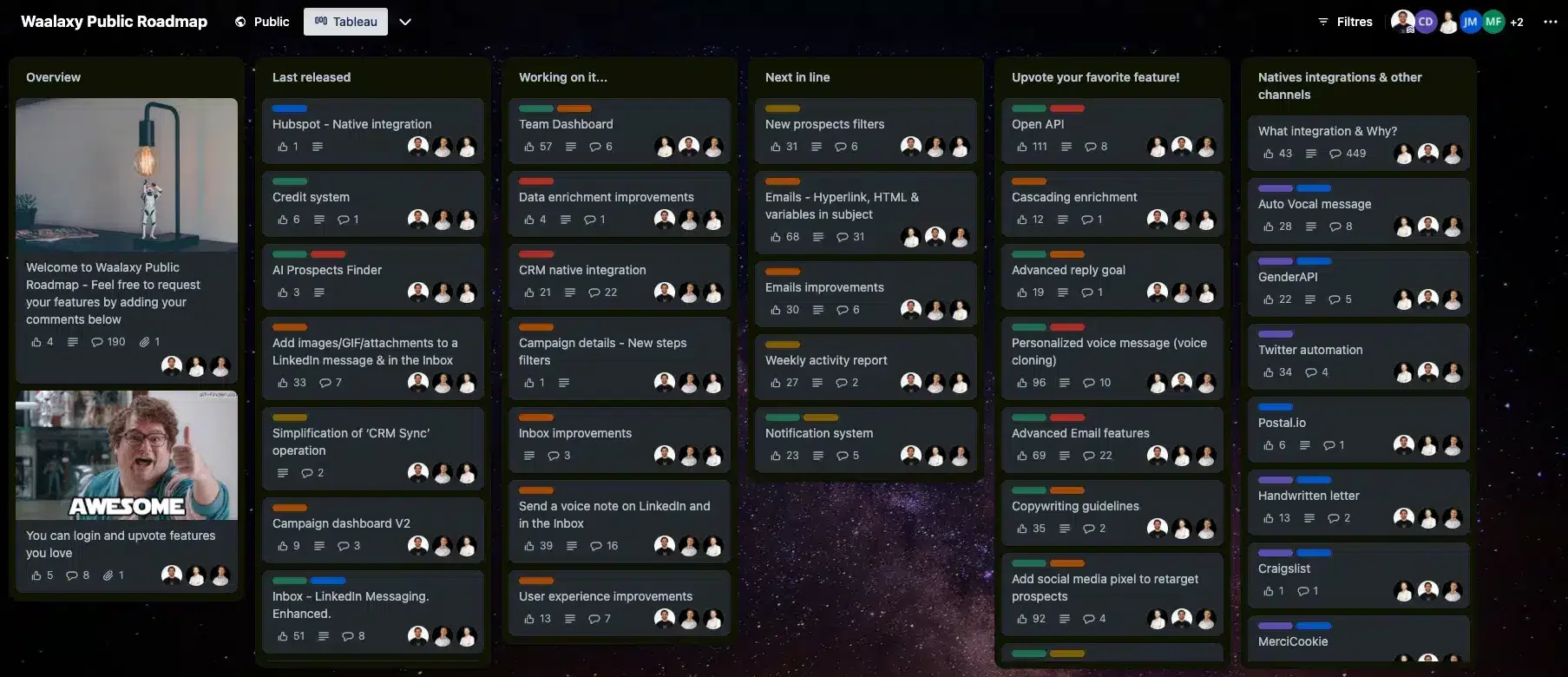
You can also participate in the evolution of the interface's functionalities by consulting the public roadmap in real time! 🤩
At Linked-Helper
Various resources are available:
❓“Knowledge base”, a FAQ equivalent.
🎥 “Video tutorials”, you'll have access to their YouTube channel, which features all their tutorials. It's complete, but only available in English. (Remember to activate subtitles😉)
🧐 “Tip of the day”, as the name suggests, this is the tip of the day.
🛟 Customer support, which is very responsive and responds correctly to your problems, and in all languages.
📩 You can also contact them via Messenger or WhatApp. These are not discussion groups, so you'll only be able to chat with a member of their team.

If you'd like to explore other resources, visit their website where you'll find :
📝 The blog and FAQs at « Knowledge base ».
👩🏻💻 You can register for their webinar.
💬 You'll have access to a chat room.
The comparative as of habitude👇🏻 :
Resource | Waalaxy | Linked-Helper |
|---|---|---|
News / What's new? | ✅ | ✅ |
FAQ | ✅ | ✅ |
Newsletter | ✅ | ❌ |
Video | ✅ | ✅ |
Webinar | ✅ | ✅ |
Blog | ✅ | ✅ |
E-book | ✅ | ❌ |
Publicly accessible roadmap | ✅ | ❌ |
Presence on social networks | ✅ | ❌ |
Community | ✅ | ❌ |
Help Center | ✅ | ✅ |
Customer support | ✅ | ✅ |
Messenger | ❌ | ✅ |
WhatApp | ❌ | ✅ |
Conclusion: Waalaxy VS Linked-Helper, which platform to choose?
Both companies offer an automation tool on LinkedIn, but with different objectives and experiences. 👀
The choice here depends on your , your level of expertise in the field and your personal preferences.
Waalaxy distinguishes itself from Linked-Helper thanks to three strong points:
🥇 Its intuitive interface is easy to learn and use.
🥈 Its variety of uses enabling fast, simple and secure automation for your LinkedIn account, as well as email management.
🥉 Its different translations make it accessible to all.
What's more, it works even when your computer is switched off, thanks to the Cloud, which is no mean feat. 👀
Nevertheless, Linked-Helper stands out for its many features/extensions and customizability (although you'll need some basic knowledge)!
Whatever tool you choose, it must be aligned with your needs, skills, goals and strategy! 😌
By the way, see our other comparative articles with Octopus, Dux-Soup, HeyReach, Lemlist and LeadFuze.
Here's our latest table, which we hope will help you make your choice. 👇🏻
Conclusion | Waalaxy | Linked-Helper |
|---|---|---|
Automated campaign | ✅ | ✅ |
Customized sequences | ✅ | ✅ |
Email search | ✅ (43,3%) | ✅ (21,6%) |
Email templates | In progress | ❌ |
Sending cold emails | ✅ | ❌ |
IA lead generation | ✅ | ❌ |
Integration with third-party tools | ✅ | ✅ |
Multi-channel prospecting | ✅ | ✅ |
Security for our Linkedin account | ✅ | ❌ |
A/B test | ✅ | ❌ |
LinkedIn messaging | ✅ | ✅ |
Synchronizing messages with Linkedin | ✅ | ❌ |
Detailed statistics | ✅ | ✅ |
Ease of use | ✅ | ❌ |
Customer service | ✅ | ✅ |
Community | ✅ | ❌ |
Help Center | ✅ | ✅ |
Publicly accessible roadmap | ✅ | ❌ |
Answers to your questions! (FAQ)
How do I migrate from Linked-Helper to Waalaxy?
Have you decided to switch tools and want to move from Linked-Helper to Waalaxy? You'll save time every step of the way on LinkedIn, and here we explain how to migrate from Linked-Helper to Waalaxy! 🚀
The 6 steps to getting started with Waalaxy?
New to Planet Waalaxy and in a fog? Don't panic! 🫨
Today, we're here to help you quickly get acquainted with Waalaxy. Where to start on this new planet? 🪐
Let's start with the basics, launching your first campaign. 🍾
Is prospecting on LinkedIn safe?
Automation on LinkedIn can be very useful for you. It can help you find new customers and opportunities quickly and efficiently. However, there are risks such as:
❌ Having your LinkedIn account blocked or suspended.
🚨 Receive alerts.
👩🏻⚖️ Violate LinkedIn's terms of use.
😔 Damage your reputation on LinkedIn by sending impersonal messages, or having your leads perceive you as a spammer.
But, rest assured, there are best practices to avoid these risks and make your prospecting campaigns a success! 👩🍳
✅ Respect LinkedIn rules (quotas...)
💌 Personalize your messages, you need to make your prospect feel unique!
👩🏻💼 Use a professional account for greater credibility.
⚙️ Choose an intuitive, high-performance, undetectable tool like Waalaxy!